
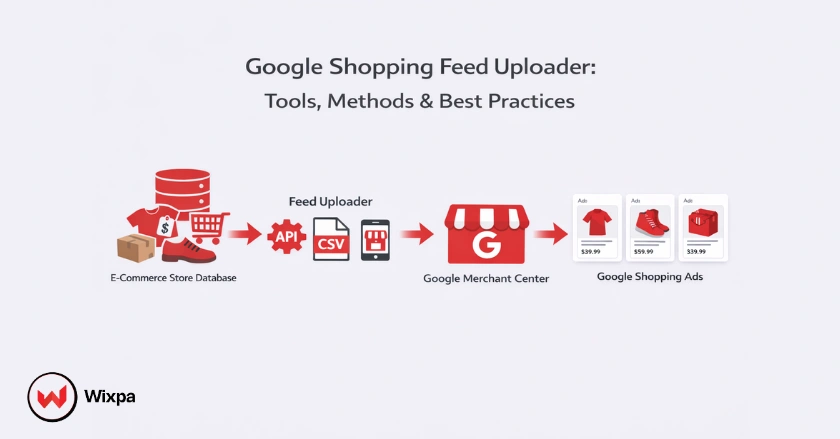
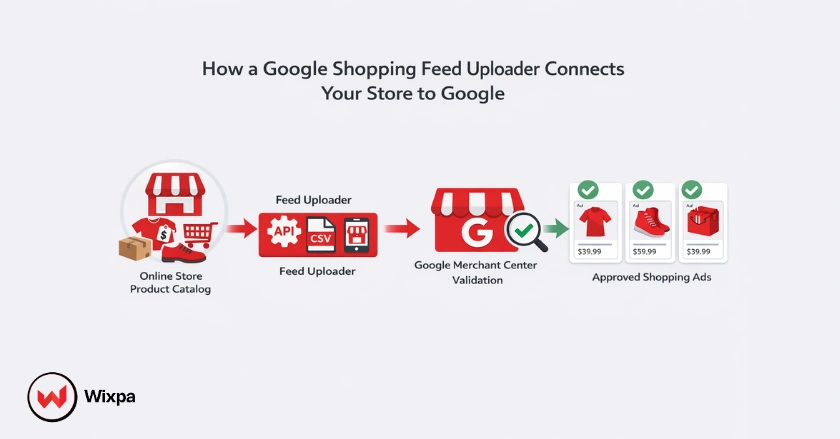
A Google shopping feed uploader is the digital bridge that transfers your product data from your online store to Google Merchant Center. It ensures that your inventory, including images, prices, and descriptions, appears correctly in Shopping ads, directly influencing your visibility and sales.
If you get this step wrong, your products might never reach the search results page. But get it right, and you set the foundation for a high-performing campaign that drives revenue. This guide breaks down exactly how to choose the right uploader tool and master the process for your store.
Quick Summary
- What is it? A tool or method (API, file, app) to send product data to Google.
- Why it matters: Accuracy prevents suspensions and boosts ad relevance.
- Best for SMBs: Content API apps like Wixpa for real-time sync and easier feed control.
- Best for Enterprise: Feed management tools like Feedonomics or Channable.
- Pro Tip: Clean your data before uploading to avoid Google Merchant Center errors.
Understanding Google Shopping Feed Uploader
Your Google Shopping feed uploader controls how product data reaches Google and directly impacts ad visibility, approval, and ROAS.
Why Your Google Shopping Feed Uploader is Your First Optimization Tool
Many store owners treat the upload process as a simple administrative task, just clicking a button to “sync” products. This is a mistake. Your Google Shopping feed uploader is actually your first line of defense against wasted ad spend. The method you choose determines how often your data updates, how easy it is to fix errors, and whether you can customize titles for SEO without changing them on your website.
Critical Role of Accurate Product Data in Google Shopping Ads
Google Shopping doesn’t use keywords like traditional search ads. Instead, it relies entirely on the data in your feed to match user searches to your products. If your uploader sends incomplete or messy data, Google won’t know when to show your ads. Accurate attributeslike GTINs, MPNs, and specific product categoriesare the signals Google needs to rank you.
Master Your Upload for Maximum ROAS
We aren’t just looking at how to move a file from Point A to Point B. This guide covers the strategy behind the upload. You will learn about selecting the right feed management tools, scrubbing your data for errors, and using advanced methods like API connections to keep your product listings fresh and competitive.
What is the Google Shopping Feed Blueprint?
A Google Shopping feed defines how product information is structured and interpreted by Google Shopping and Merchant Center.
What is a Google Shopping Feed (Product Data Feed)?
A Google Shopping feed is a structured file containing a list of the products you want to advertise. It organizes your inventory using specific attributes defined by Google, such as title, description, link, image_link, price, and availability. Think of it as a spreadsheet that speaks Google’s language, translating your store’s catalog into a format Shopping ads can understand.
The Indispensable Role of the Feed for Google Merchant Center and Shopping Ads
Your feed lives in the Google Merchant Center. This platform acts as a holding tank where Google validates your data before approving it for ads. Without a healthy feed in the Merchant Center, you cannot run Google Shopping campaigns. The feed is the single source of truth; if the price in your feed doesn’t match the price on your landing page, Google will disapprove the item to protect the user experience.
Product Information and Essential Attributes
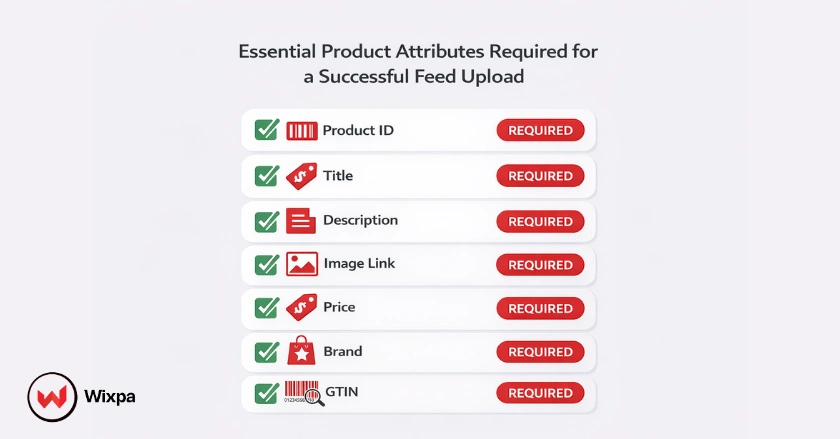
Every product in your feed requires specific data points to be valid. Missing any of these will result in errors:
- ID: A unique identifier for the item (SKU).
- Title: The name of your product (vital for SEO).
- Description: Details about the item.
- Link: The URL to the product page.
- Image Link: The URL of the main product image.
- Price: The current selling price and currency.
- Brand: The brand name of the product.
- GTIN: Global Trade Item Number (UPC, EAN).
How Does Your Initial Upload Impact Performance?
The first feed upload determines product approval, search relevance, and long-term Shopping ad performance.
How Your Upload Dictates Campaign Performance
The quality of your data at the moment of upload sets your ceiling for success. If you upload generic titles like “Blue Shirt,” you will struggle to capture high-intent traffic searching for “Men’s Navy Slim-Fit Cotton Shirt.” Your Google Shopping feed uploader method should allow you to map internal fields to optimized external values, ensuring your data works hard for you from day one.
Preparing for Search Relevance and Google AI Mode
Think like a shopper, not a warehouse manager. When setting up your uploader, consider how users search. Are they looking for model numbers? Specific colors? Materials? Google’s algorithms, including Google AI Mode and smart bidding strategies, crave this structured data. The more granular detail you provide during the upload, the better Google’s AI can match your product to the right query.
Common Pitfalls of a Rushed Upload
Rushing the upload often leads to Google Merchant Center suspensions. Common issues include:
- Mismatching prices: The feed says $20, but the site says $25.
- Missing shipping info: Failing to configure shipping settings in Merchant Center.
- Policy violations: Uploading restricted items without proper labeling.
These errors kill your momentum and can take days or weeks to resolve, resulting in lost revenue.
How Do You Prepare Data for a Flawless Upload?
Clean, consistent product data reduces errors and improves visibility across Google Shopping surfaces.
Data Cleanliness and Consistency
Before you connect any tool, audit your product data on your ecommerce platform. Remove HTML tags from descriptions, ensure images are high-resolution and on white backgrounds, and verify that all variants (size/color) have unique SKUs. Garbage in means garbage out no tool can fix fundamentally broken source data.
Optimizing Key Attributes Before You Upload
Focus your energy on the attributes that impact rank:
- Product Titles: Front-load important keywords (Brand + Product Type + Attributes).
- Product Type: Use your store’s taxonomy to help structure your campaigns later.
- Images: Ensure your product images are clear and follow Google’s strict guidelines (no watermarks or text).
Leveraging Optional Attributes for Strategic Advantage
Don’t stop at the required fields. Optional attributes give you a competitive edge. Adding sale_price, material, pattern, and gender helps you show up in filtered searches. Product highlights and lifestyle images are also becoming increasingly important for standing out in modern layouts.
The Role of Product Information Management (PIM) Software in Data Preparation
For merchants with thousands of SKUs, managing data in a spreadsheet is impossible. Product Information Management (PIM) software centralizes your data, allowing you to enrich descriptions and standardize specs across all channels before it ever reaches your Google Shopping feed uploader.
Which Upload Method Should You Choose?
The best upload method depends on store size, update frequency, and optimization requirements.
Choosing the Right Method
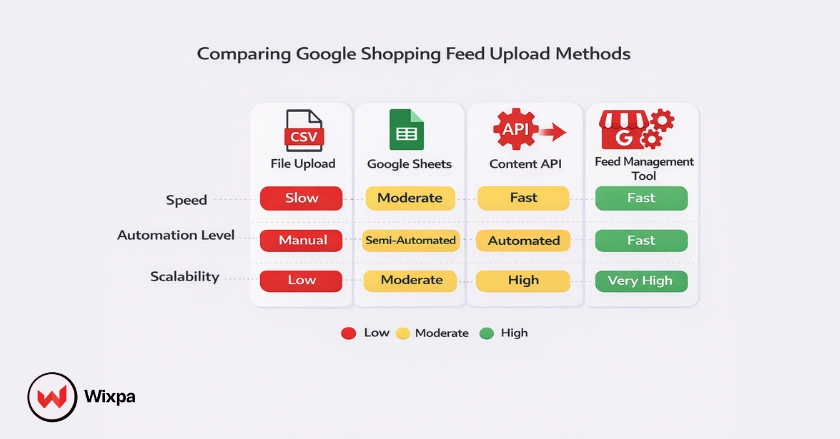
If you want speed and scale, use API-based feed apps. If you want deep optimization and control, use a feed management platform like Wixpa Google Shopping Feed.
| Method | Best For | Pros | Cons |
| Direct Upload (File) | Small catalogs (<50 items) | Simple, total control | Manual updates required, high error risk |
| Google Sheets | Small to Mid-sized | Easy to edit, free | Can break easily, requires manual maintenance |
| Content API (App) | SMBs (Shopify/WooCommerce) | Real-time updates, easy setup | Limited customization, hard to optimize titles |
| Feed Management Tool | Growth & Enterprise | Powerful rules, optimization, support | Monthly cost, learning curve |
| Scheduled Fetch | Mid-sized | Automated updates from URL | Requires hosting a file, slower update frequency |
What Are the Top Feed Management Tools?
The best upload method depends on store size, update frequency, and optimization requirements.
Why Leverage Specialized Feed Management Tools?
Third-party feed management tools sit between your store and Google. They import your raw data, apply rules to clean and optimize it (like “If title lacks brand, append brand”), and then send the polished feed to Merchant Center. This protects your site’s data structure while maximizing ad performance.
Comprehensive Feed Management Platforms
For large sellers, robust platforms are essential:
- Wixpa: Offers full-service data optimization and 24/7 support.
- GoDataFeed: Great for syndicating to multiple channels (Amazon, Facebook, Google).
- ChannelAdvisor: A massive suite for enterprise multichannel operations.
Specialized Uploader & Optimization Tools
For smaller teams needing efficiency:
- Wixpa: Affordable and intuitive rule-based mapping for smaller and larger teams.
- Simprosys (Shopify): excellent for simple API connections with some customization features.
- DataFeedWatch: powerful optimization capabilities at a mid-range price point.
How Do You Optimize After Uploading?
Post-upload optimization improves approval rates, relevance, and return on ad spend over time.
Google Merchant Center Diagnostics
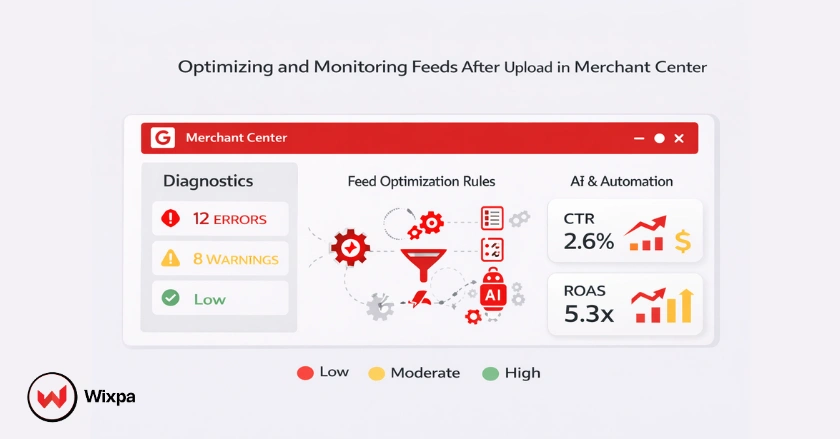
Once your data is uploaded, check the Diagnostics tab in Merchant Center immediately. It categorizes issues by severity: Account issues (suspensions), Feed issues (processing errors), and Item issues (individual disapprovals). Address red “Error” flags first, as these prevent products from showing.
Continuous Feed Optimization for Enhanced Google Shopping ROAS
Optimization isn’t a one-time task. Use feed rules in Merchant Center or your third-party tool to:
- A/B test different product titles.
- Create custom labels for products with high margins or low stock.
- Exclude unprofitable products from the feed entirely.
The Importance of Consistent Landing Pages and Accurate Product Representation
Your landing page must match your feed exactly. If a user clicks an ad for a red sneaker and lands on a page showing a blue one, they will bounce. Use structured data (schema markup) on your site to help Google’s crawlers verify price and availability automatically, reducing the risk of “mismatch” disapprovals.
Will AI Change Google Shopping Feeds?
Google AI relies on structured feed data to generate accurate product listings and automated ad placements.
How Your Upload Feeds Google’s AI-Powered Product Optimization
Google is increasingly using generative AI to enhance product listings. By providing rich, structured data, you give Google’s AI the raw material it needs to generate better descriptions, summarize reviews, and show your product in relevant, conversational search results (SGE).
The Increasing Importance of Clean, Structured Product Data for Machine Learning
As Performance Max and other automated campaigns take over, your manual levers (like keyword bidding) disappear. Your feed becomes your primary lever. Clean data trains the machine learning models faster, helping them find your ideal customers more efficiently.
Preparing for AI-Enhanced Supplemental Feeds and Dynamic Product Enhancements
Google can now use AI-enhanced supplemental feeds to fill in gaps in your data. However, relying solely on this is risky. The best strategy is to own your data. Provide high-quality attributes upfront so AI enhances your listing rather than fixing it.
Conclusion
Your feed is the heartbeat of your e-commerce advertising. Choosing the right Google Shopping feed uploader and maintaining a clean, optimized data stream is not optional; it’s the difference between profitable growth and wasted budget.
Remember, the tool you use influences your agility. A robust uploader allows you to react to market trends, change titles for holidays, and fix errors instantly. Treat it as a strategic asset.
Don’t rush the setup. Spend time on your data quality. Choose a method that scales with you. And never stop monitoring your diagnostics.
Take a look at your current feed setup. Are you maximizing every attribute? If not, it’s time to upgrade your tools and your mindset.
Pro Tips for Feed Success
- Use Supplemental Feeds for Sales: Don’t overwrite your main prices. Use a supplemental feed to apply sale prices and start/end dates for promotions.
- Leverage Custom Labels: Use labels (0-4) to group products by “Best Sellers,” “Clearance,” or “Winter Season” for better bidding segmentation in Google Ads.
- Check GTINs: Valid GTINs are the strongest signal for matching products. If you have them, use them. If not, use identifier_exists = no.
Final Thoughts
The ecommerce landscape is shifting toward automation, but that doesn’t mean you should be hands-off. The winners in 2026 and beyond will be the merchants who feed the best data into the AI engines. Start treating your Google Shopping feed uploader with the respect it deserves, and watch your ROAS climb.
FAQs
1. What is the best Google Shopping feed uploader for Shopify?
For most Shopify users, the Wixpa Google Shopping Feed app is the best balance of price and features. It uses the Content API for real-time updates but offers robust customization options for titles and attributes that the native Shopify integration lacks.
2. How often should my product feed update?
Ideally, your feed should update automatically whenever product information changes (real-time via API). If you use a scheduled fetch or file upload, aim for at least once every 24 hours to keep price and availability accurate and avoid policy violations.
3. Can I upload a Google Shopping feed manually?
Yes, you can upload a Google Shopping feed manually using a Google Sheet or a text file (TXT/XML). However, this is not recommended for stores with frequently changing inventory, as you must manually update the file every time a price or stock level changes.
4. Why are my products disapproved in Merchant Center?
Products are usually disapproved due to data mismatches (price on feed vs. site), missing required attributes (like GTIN or shipping info), or policy violations (selling restricted items). Check the Diagnostics tab in Merchant Center for specific error messages.
5. What is the difference between a primary feed and a supplemental feed?
A primary feed creates or updates your product inventory. A supplemental feed provides additional data (like sale prices or custom labels) to products that already exist in your primary feed. You use supplemental feeds to fix or enhance data without altering the main source file.