
Managing your Google Shopping feed is important. It can decide your e-commerce advertising success. A well-optimized feed puts your products in front of the right customers at the right time. A poorly maintained feed leads to disapprovals, wasted ad spend, and lost sales.
The good news? With the right approach, feed management is simple. It leads to consistent results. This guide shows you how to create, improve, and manage a strong Google Shopping feed. It helps you boost your return on ad spend and keeps your products visible on Google.
Quick Summary
To manage your Google Shopping feed well:
- Make sure your product data is accurate and meets Google’s specs.
- Optimise titles and descriptions with relevant keywords.
- Use feed rules and custom labels for better segmentation.
- Check feed health often to avoid disapprovals.
- Use automation tools like Wixpa to help with updates.
Consistent monitoring and data-driven optimization are essential for sustained performance.
What is a Google Shopping Feed and Why Does it Matter?
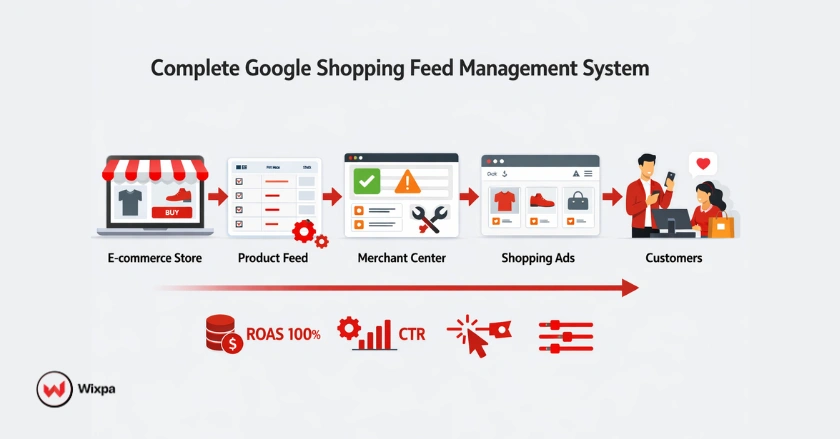
Your Google Shopping feed is the backbone of your Product Listing Ads strategy. It’s a structured file. It has your product details. This includes titles, descriptions, prices, images, and availability. Google uses this to show your products to potential customers.
Understanding Google Shopping and Google Merchant Center
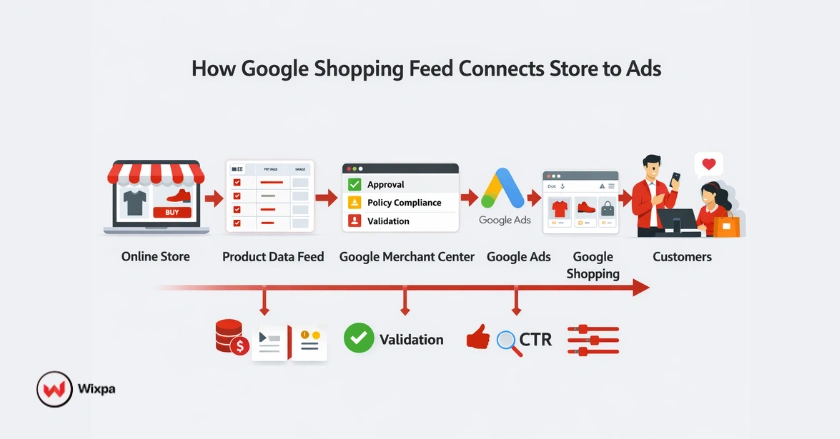
Google Shopping lets retailers display products right in search results. You can see images, prices, and merchant details. Product Listing Ads offer a visual shopping experience. This is different from traditional text ads. As a result, they boost engagement and conversion rates.
To join Google Shopping, upload your product data feeds to Google Merchant Center. This platform connects your e-commerce store to Google Ads. It checks your product information and makes sure it meets Google’s standards.
Google Merchant Center (GMC)
Google Merchant Center is where all feed management begins. It’s your main spot for uploading product feeds. You can check feed health, fix errors, and track performance metrics here. GMC offers feed diagnostics that point out problems with your product data. This helps you stay compliant with Google’s policies.
A well-set-up Merchant Center account links smoothly with your Google Ads campaigns. This helps your products show on Google Search. They can also appear on the Shopping tab, YouTube, and other Google sites.
Building a High-Quality Feed
Quality trumps quantity when it comes to product feeds. A smaller catalog with clear, accurate details performs better. A large catalog with incomplete or confusing data does not.
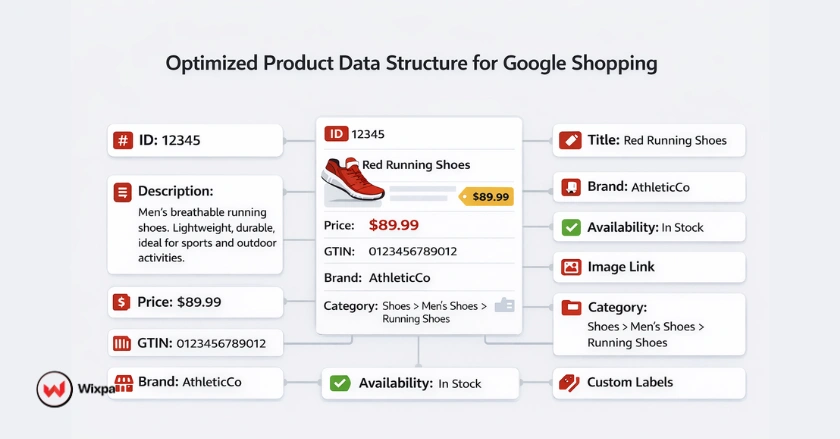
Adhering to Google’s Product Data Specifications
Google maintains strict requirements for product attributes. Required fields include:
- ID: Unique product identifier
- Title: Clear, descriptive product name
- Description: Detailed product information
- Link: Direct URL to your landing page
- Image_link: High-quality product image URL
- Availability: In stock, out of stock, or preorder
- Price: Current selling price
- Brand: Product manufacturer or brand name
- GTIN (Global Trade Item Number): When available, improves ad relevance
Missing or incorrect product details lead to immediate feed disapproval. Review Google’s product data specifications regularly to ensure compliance.
Optimizing Core Product Attributes for Visibility and Relevance
Product titles are your most powerful tool for visibility. Effective titles include:
- Brand name at the beginning
- Key product features (color, size, material)
- Product type or category
- Relevant descriptive terms
Example: “Nike Air Zoom Pegasus 39 Men’s Running Shoes Black/White, Size 10”
Expand your product description beyond the title. Include details about features, benefits, materials, and how to use it. Google doesn’t display descriptions in Shopping ads. However, they do affect ad relevance and quality scores.
Product images should be high-quality. They must clearly show the item against a white or neutral background. Showing different angles and lifestyle shots helps customers see what they’re buying. This reduces return rates and makes shopping better.
Maintaining Data Consistency Across Platforms
Your landing pages must match the information in your feed. If your feed shows a product at $49.99 and the landing page shows $59.99, Google will disapprove it. This is because of incorrect pricing. Similarly, availability status must reflect real-time product inventory.
Consistency extends to product schema markup on your website. Using structured data markup helps Google grasp your product info. It can also improve how your products show up in search results.
Strategic Feed Optimization for Enhanced Performance
Beyond meeting basic requirements, strategic optimization separates average campaigns from exceptional ones.
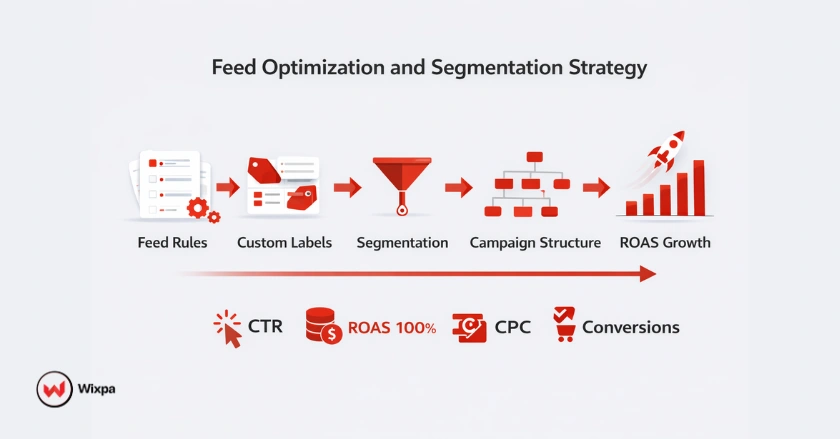
Leveraging Feed Rules for Data Transformation and Enrichment
In Google Merchant Center, feed rules let you change product data. You can do this without changing your source feed. Common applications include:
- Appending brand names to titles that lack them
- Standardizing color names across variants
- Adding category-specific keywords to descriptions
- Adjusting prices or applying promotional markups
Feed attribute rules use conditions to update certain products based on your criteria. For example, you might create a rule that adds “Men’s” to all product titles in your men’s clothing category.
Utilizing Supplemental Feeds for Advanced Data Management
A supplemental feed boosts your main feed. It enhances or changes features for certain products. This approach is particularly useful when:
- Your e-commerce platform limits certain fields
- You need to test different titles or descriptions
- You want to add custom labels without modifying your main feed
- You’re managing product feeds across multiple channels
Supplemental feeds offer flexibility. You don’t need to change your website or main data source.
Advanced Segmentation with Custom Labels
Custom labels are optional attributes that enable sophisticated campaign management. You can assign up to five custom labels per product, categorizing items by:
- Profit margin (high, medium, low)
- Seasonality (summer, fall, winter, spring)
- Performance tier (best sellers, new arrivals, clearance)
- Product lifecycle stage
- Promotional status
These labels help you create targeted campaigns. You can adjust bids based on profitability and analyse performance by segment. This way, you maximise ad performance without splitting your catalog into multiple campaigns.
Maximizing Ad Performance and ROAS
Feed optimization directly impacts your return on ad spend. Products with clear details, good prices, and catchy titles get more clicks and sales.
Monitor which product categories drive the most revenue and refine those listings first. Try out various title formats. Highlight what makes your products stand out. Also, make sure your top-selling items have all the right information.
Proactive Feed Health and Error Prevention
Feed disapprovals disrupt your advertising and cost you sales. Preventing errors is far more efficient than fixing them after they occur.
Understanding Common Feed Disapprovals and Warnings
The most frequent feed issues include:
- Missing required attributes: Products lack essential fields like GTIN, brand, or Google Product Categories
- Incorrect pricing: Price on landing page doesn’t match feed data
- Unavailable products: Items marked as in stock when they’re actually unavailable
- Policy violations: Products that violate Google’s Shopping policies
- Broken links: Landing pages return 404 errors
- Image quality issues: Low-resolution or watermarked product images
- Mismatched data: Inconsistencies between feed and website content
The Diagnostics tab in Google Merchant Center shows all active issues. It lists severity levels and affected products.
Implementing Preventative Measures and Best Practices
Prevent common errors by:
- Automating feed updates: Schedule regular uploads to keep inventory and pricing current
- Validating data before upload: Check for malformed data, missing fields, and formatting errors
- Testing landing pages: Ensure all product URLs are functional and load quickly
- Reviewing policy compliance: Familiarize yourself with Google Shopping policies for your product categories
- Using accurate shipping estimates: Provide realistic delivery timeframes
- Maintaining product inventory sync: Connect your feed to real-time stock levels
Streamlining Error Correction
When errors occur, prioritize based on impact. Address disapprovals before warnings, and fix issues affecting high-volume or high-margin products first.
The Content API for Shopping provides programmatic access for large-scale error correction. If you manage thousands of SKUs, API access enables batch updates and automated error remediation.
Automation and Tools for Efficient Feed Management
Manual feed management becomes unsustainable as your catalog grows. Automation reduces human errors, saves time, and ensures your feed stays current.
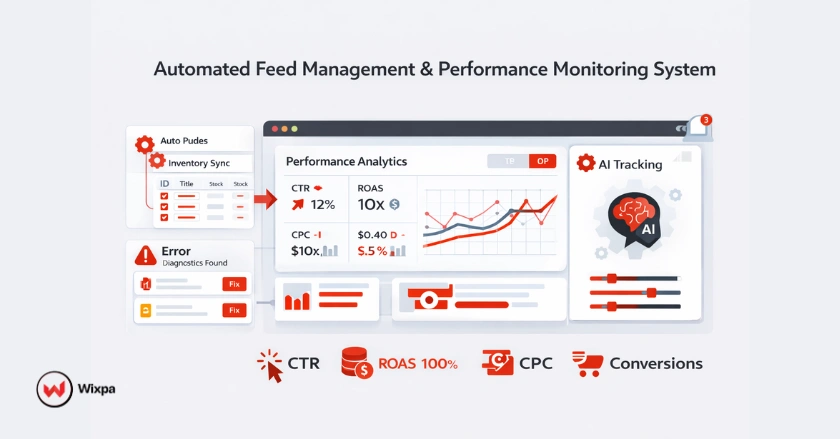
The Power of Automation in Feed Management
Feed automation handles repetitive tasks like:
- Scheduled feed uploads
- Dynamic pricing updates
- Inventory synchronization
- Bulk attribute modifications
- Automated error detection and alerts
Automation is very useful for retailers. It helps when inventory changes often, with seasonal products, or during promotional pricing.
Exploring Google Feed Management Tools
Google Merchant Center includes built-in tools for feed management:
- Automatic item updates: Google automatically updates price and availability from your landing pages
- Feed rules: Transform data without modifying source files
- Content API: Enables real-time updates via REST API
- Supplemental feeds: Override or add attributes to existing products
These native tools work well for straightforward feed management needs.
Integrating with E-commerce Platforms
Most major e-commerce platforms offer Google Shopping integrations:
- Shopify: Built-in Google channel for automatic feed creation
- WooCommerce: Various plugins for feed generation and management
- BigCommerce: Native Google Shopping integration
- Magento: Extensions for product feed management
Platform integrations simplify initial setup but may lack advanced optimization features.
Third-Party Feed Management Solutions
For advanced needs, third-party tools offer sophisticated features. Wixpa stands out as a top solution for Google Shopping feed management, providing:
- Automated feed optimization with AI-driven suggestions
- Multi-channel feed distribution (Google, Facebook Shopping, and more)
- Advanced error monitoring and alerts
- Bulk editing capabilities
- Performance analytics and reporting
- Custom label automation
- Dynamic pricing rules
Other notable solutions are DataFeedWatch, GoDataFeed, and Feedonomics. Each has unique strengths for various business sizes and needs.
Continuous Monitoring, Analysis, and Iteration for Sustained Success
Feed management isn’t a one-time task. Consistent monitoring and optimization drive long-term performance improvements.
Tracking Key Performance Indicators (KPIs)
Monitor these essential metrics:
- Click-through rate (CTR): Measures how compelling your product listings are
- Conversion rate: Shows how effectively your landing pages convert visitors
- Cost per click (CPC): Indicates competitive pricing in your product categories
- Return on ad spend (ROAS): Measures overall campaign profitability
- Impression share: Reveals how often your products appear in relevant searches
- Feed approval rate: Tracks what percentage of your catalog is active
Google Analytics gives you insights into customer behaviour. It helps you see which products bring the most value.
Iterative Optimization Based on Data
Use performance data to guide optimization:
- Refine titles for products with low CTR
- Adjust bids on high-converting products
- Pause or optimize underperforming items
- Test different images for products with high impressions but low clicks
- Expand custom labels based on profitability patterns
A/B test changes when possible. Adjust titles or images for a few products, check the results, then apply successful changes to your entire catalog.
Staying Current with Google Shopping Updates
Google regularly updates policies, product data specifications, and algorithm behaviors. Subscribe to the Google Merchant Center blog and monitor announcements about:
- New attribute requirements
- Policy changes affecting your categories
- Beta features and testing opportunities
- Performance Max campaigns enhancements
- Google AI-driven improvements to ad delivery
Staying informed helps you adapt quickly and maintain competitive advantages.
Integrating Feed Management into Your Broader E-commerce Strategy
Your Google Shopping feed doesn’t exist in isolation. It should align with your overall business objectives and marketing strategy.
Aligning Feed Data with Inventory and Merchandising Goals
Coordinate feed management with your merchandising team. Prioritize:
- Promoting seasonal products during relevant periods
- Highlighting new arrivals with custom labels
- Clearing out-of-stock items or end-of-season inventory
- Featuring products with the highest profit margins
This alignment ensures your advertising budget focuses on products that advance business goals.
Enhancing the End-to-End Customer Journey
Feed quality impacts the entire customer journey. Accurate product information sets proper expectations, reducing returns and negative reviews. High-quality images help customers make confident purchase decisions.
Your feed should reflect the shopping experience you want customers to have. Position your brand as premium. Make sure your product titles, descriptions, and images show that quality.
The Role of Feed Management in Overall Business Growth
Effective feed management contributes to business growth by:
- Increasing visibility for your products
- Attracting qualified traffic to your site
- Improving conversion rates through accurate product information
- Reducing wasted ad spend on disapproved or underperforming products
- Enabling data-driven decision making about product selection and pricing
Retailers who invest in feed quality see clear boosts in campaign performance and profits.
Final Thoughts
To manage your Google Shopping feed effectively, focus on details, plan wisely, and keep improving. First, make sure your product data meets Google’s standards. Then, gradually use advanced techniques like custom labels, feed rules, and automation.
Remember these key principles:
- Quality data is non-negotiable
- Consistency across platforms prevents disapprovals
- Automation saves time and reduces errors
- Continuous monitoring drives improvement
- Strategic segmentation maximizes ROAS
The effort you put into feed management brings rewards. You’ll see better visibility, higher conversion rates, and more efficient ad spend. You can manage feeds by hand or with tools like Wixpa. Either way, your goal is clear: connect your products to customers who are ready to buy.
Start with the basics, measure results, and refine your approach based on data. Your pathway to Google Shopping success begins with a well-managed feed.
FAQS
1: What is the best way to manage a Google Shopping feed?
The best way to manage a Google Shopping feed is to maintain accurate product data, follow Google’s product specifications, optimize titles and descriptions with keywords, use feed rules and custom labels, automate updates, and continuously monitor feed health through Google Merchant Center for errors and disapprovals.
2: How often should a Google Shopping feed be updated?
A Google Shopping feed should be updated daily or in real time to keep pricing, inventory, and availability accurate. Frequent updates prevent disapprovals, improve ad performance, and protect ROAS by ensuring data consistency between your website and Google.
3: Why do Google Shopping feeds get disapproved?
Google Shopping feeds get disapproved due to missing required attributes, price mismatches, incorrect availability, policy violations, broken links, low-quality images, and inconsistent data between the feed and landing pages.
4: How does automation improve Google Shopping feed management?
Automation improves feed management by enabling real-time inventory sync, dynamic pricing updates, automated error detection, bulk edits, scheduled uploads, and performance-based optimization, reducing manual errors and saving operational time.
5: What tools are best for managing Google Shopping feeds?
The best tools for managing Google Shopping feeds include Wixpa, Feedonomics, and Google Merchant Center’s built-in tools, such as feed rules, Content API, and supplemental feeds.