
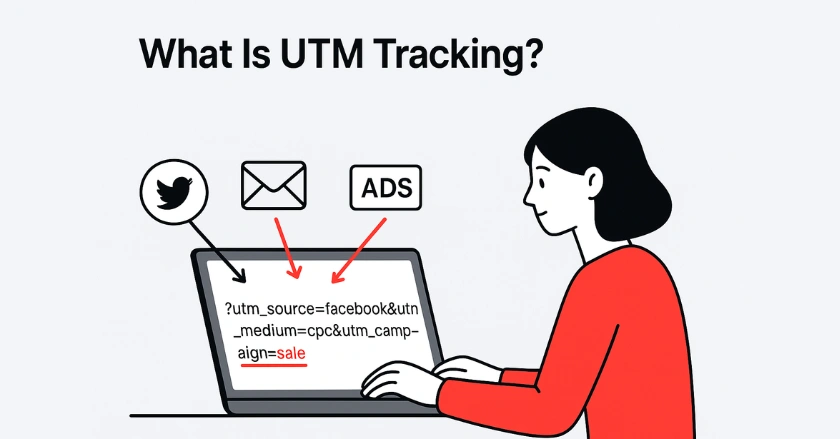
What Is UTM Tracking?
Ever wonder which of your marketing efforts are actually driving website traffic and conversions? UTM tracking is the key to unlocking that data, giving you a clear picture of what works and what doesn’t. By reading this guide, you’ll learn how to use UTM codes to measure your campaign performance accurately.
Quick Summary
UTM tracking involves adding special codes, known as UTM parameters, to your website URLs. These codes tell analytics tools like Google Analytics exactly where your website visitors are coming from. This allows you to measure the effectiveness of your marketing campaigns, from social media posts to email newsletters, and make data-driven decisions to improve your ROI.
What Is the Foundation of UTM Tracking?
UTM tracking is the backbone of effective digital marketing, allowing marketers to attribute website traffic to specific campaigns. Without it, you’re flying blind, unable to prove which initiatives are truly driving results. It’s the standard practice for any serious marketer looking to understand their audience and optimize spending.
What is a UTM? Unpacking the Urchin Tracking Module
A UTM, or Urchin Tracking Module, is a simple snippet of text added to the end of a URL. This code doesn’t change the destination of the link, but it provides your analytics tool with valuable tracking information about how a user arrived at your site. Think of it as a digital name tag for every link you share.
How UTMs Work
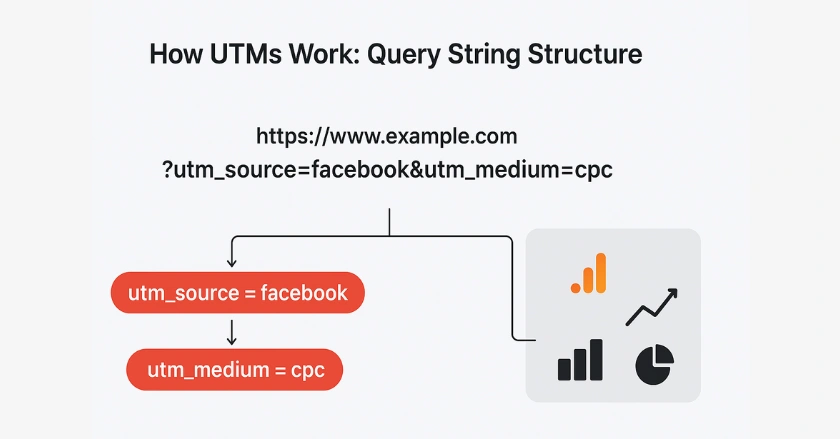
UTMs work by creating what’s known as a query string. This string begins with a question mark (?) and is added to your base URL. It contains a series of “parameter=value” pairs, with each pair separated by an ampersand (&). When a user clicks the link, your analytics software reads this query string to categorize the traffic.
A Brief History
The concept of the Urchin Tracking Module originated with Urchin Software Corporation, a web analytics company that Google acquired in 2005. This technology became the foundation for what we now know as Google Analytics. The UTM system remains the industry standard for campaign tracking today, even in the latest version, Google Analytics 4.
What Are the Core Components of UTM Parameters?
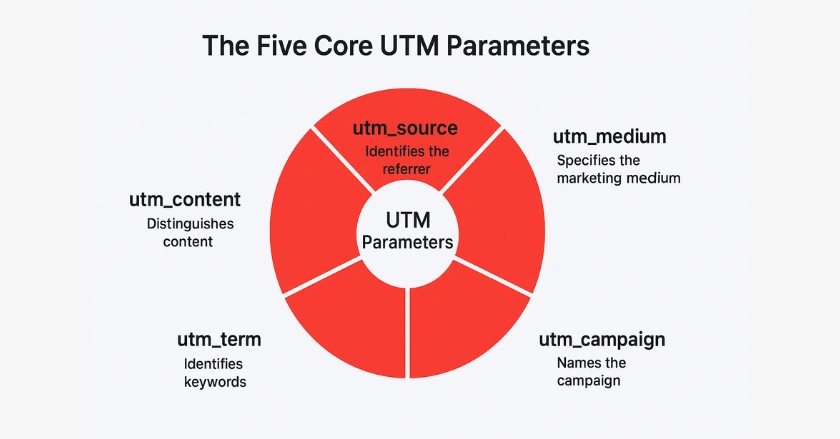
To master UTM tracking, you need to understand its five main components, or UTM parameters. Each one answers a specific question about your traffic, providing a detailed story of your user’s journey. Consistently using these parameters is crucial for accurate campaign reporting.
- utm_source: Pinpointing the Origin of Your Traffic
- utm_medium: Identifying the Marketing Channel
- utm_campaign: Categorizing Your Specific Initiatives
- utm_term: Tracking Keywords (Primarily for Paid Search)
- utm_content: Differentiating Specific Elements Within a Campaign
1. utm_source
The utm_source parameter identifies the specific platform or source that sent the traffic, such as “google,” “facebook,” or “mailchimp.” For example, if you’re running a campaign on LinkedIn, your utm_source would be “linkedin.” This is arguably the most important of all the UTM codes, as it tells you the exact origin of your visitors.
2. utm_medium
The utm_medium parameter specifies the marketing channel used, like “cpc” for paid ads, “email” for email marketing, or “social” for a social media post. This parameter helps you group your efforts into broader categories. For instance, distinguishing between paid traffic (cpc) and organic traffic from the same platform is essential for budget analysis.
3. utm_campaign
The utm_campaign parameter is used to identify a specific promotion or strategic campaign. This could be “summer-sale,” “new-product-launch,” or “q4-promo.” Using a clear and consistent campaign name helps you compare the performance of different marketing campaigns over time.
4. utm_term
While less common now with auto-tagging in Google Ads, utm_term is used to identify the specific keywords you’re targeting in a paid search campaign. For example, if you’re bidding on the phrase “ergonomic office chair,” you could set your utm_term to “ergonomic_office_chair” to track its performance on your ad’s landing page.
5. utm_content
The utm_content parameter is perfect for A/B testing. It helps you differentiate between links that point to the same URL within a single campaign, such as a blue “Buy Now” button versus a red one. By tagging each with a different utm_content value (e.g., “blue_button” vs. “red_button”), you can see which one drives more clicks and conversions.
6. utm_id (Optional)
The utm_id, or campaign ID, is an optional parameter that allows you to link your Google Analytics data with other systems, like your CRM. By assigning a unique ID to each campaign, you can upload cost data and perform more advanced ROI analysis, connecting your digital advertising efforts directly to sales outcomes.
Why Is UTM Tracking Indispensable for Digital Marketers?
UTM tracking is essential. It gives detailed data to show the ROI of your digital marketing campaigns. It turns vague metrics into clear insights. This strengthens your strategy, aids your budget, and improves your understanding of customer behaviour. Without it, you’re essentially guessing which of your efforts are successful.
- Pinpointing Campaign Performance and Proving ROI UTM tracking allows you to see exactly which campaigns are driving traffic, leads, and sales. This evidence is crucial in demonstrating the value of your marketing efforts to stakeholders. It helps secure future budgets.
- Gaining Granular Traffic Source and User Behavior Insights. By using UTM parameters, you can analyze how visitors from different sources behave on your website. Do visitors from your email newsletters bounce less than those from a specific social media platform? This data helps you tailor your content to each audience segment.
- Empowering Data-Driven Decision-Making and Strategic Optimization. Armed with precise data, you can stop making decisions based on intuition. If your Facebook summer sale campaign (utm_source=facebook, utm_campaign=summer-sale) is doing better than your Google Ads, you know where to put more resources for a higher return.
- Optimising Marketing Budgets and Resource Allocation. When you find the best channels and campaigns, you can shift your budget from areas that aren’t performing well. Then, focus more on what delivers great results. This leads to more efficient spending and a higher overall ROI for your marketing activities.
- Enhancing Customer Experience Through Personalised Journeys
Knowing how different user groups find your site lets you tailor their experience.
You can show a special welcome message on your landing page for visitors from a certain partner’s site. This creates a smooth and engaging experience for customers.
How to Create Effective UTM Tracking Links
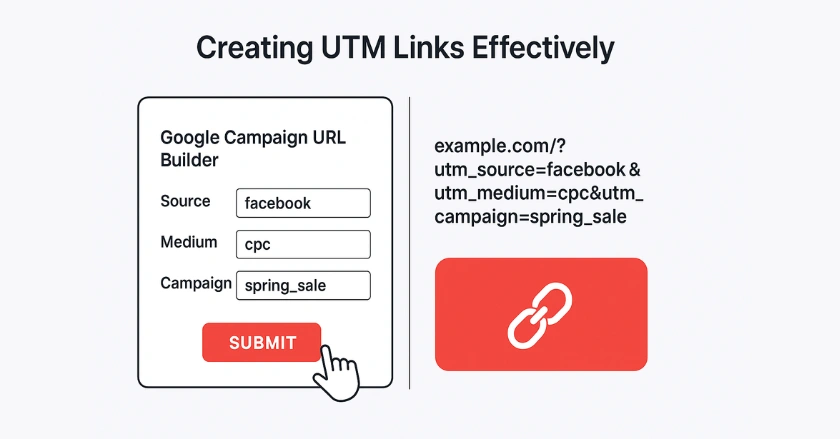
Creating effective UTM tracking links is simple, especially with the right tools. Be consistent with your naming conventions. This keeps your data clean and easy to analyse. A messy UTM tracking strategy can be worse than having no strategy at all.
- Utilizing a Campaign URL Builder (e.g., Google’s UTM Builder), the easiest way to create tracking links is with a campaign URL builder. Google’s UTM Builder is a free, popular tool. It helps you format your URLs correctly. You simply enter your website URL and the values for each parameter.
- Manual Creation and Strategic Spreadsheet Management
For advanced users, creating UTM codes manually and managing them in a shared spreadsheet is common.
This method ensures your entire team uses consistent naming conventions for source, medium, and campaign name, preventing data fragmentation in Google Analytics. - Integrating with URL Shorteners (e.g., Bitly, TinyURL) for Cleaner Links
URLs with UTM parameters can get long and messy. This is especially true on social media. Using URL shorteners makes your links cleaner and easier to share.
Using a URL shortener like Bitly helps you make clean, user-friendly links. It also keeps all the important tracking info. - Practical Example
Imagine you’re advertising a summer sale in your weekly newsletter.
Your base URL is https://www.yourstore.com/sale. Your UTM link would look like this: https://www.yourstore.com/sale?utm_source=newsletter&utm_medium=email&utm_campaign=summer-sale.
Analyzing Your UTM Data in Google Analytics 4 (GA4)
Once you’ve implemented UTM tracking, the next step is to analyze the data in Google Analytics 4 (GA4). GA4 automatically captures these parameters. This makes them available in its reports. You can measure the success of your marketing campaigns with precision.
- Where to Find Your UTM Data in GA4’s Acquisition Reports. In GA4, you can find your UTM data under the Reports > Acquisition section.
The Traffic acquisition report shows data by:- “Session source/medium”
- “Session medium”
- “Session source”
- “Session campaign”
- ” These categories match your UTM parameters.
- Interpreting Key Metrics: Sessions, Conversions, Engagement, and Revenue. Look beyond just sessions. Analyze metrics like engaged sessions, conversion rates, and total revenue for each campaign. A campaign might drive a lot of traffic, but if those visitors aren’t converting, it’s not successful. This is how you connect your digital advertising efforts to real business outcomes.
- Building Custom Reports and Segments for Deeper Insights. To explore more, make custom reports in the Explore section of GA4. You can make a free-form report using dimensions like “Session campaign” and “Session source/medium.” You can also add key metrics. This lets you break down the data to find valuable insights about your website visitors.
- Using Insights for Ongoing Improvement of Landing Pages and Campaigns
The main goal of analysing UTM data is to boost your marketing. A high bounce rate on a campaign’s landing page usually means it isn’t meeting user expectations. Keep using these insights to enhance your campaigns and landing pages for better results.
Best Practices for Flawless UTM Tracking
- Be Consistent: Create a standardized naming convention and stick to it. Use lowercase letters, and use dashes instead of spaces.
- Use a Spreadsheet: Keep a shared spreadsheet to track all your UTM links. This prevents inconsistencies and helps your team stay aligned.
- Don’t Use UTMs on Internal Links: Never use UTM tags for links within your own website. This can overwrite the original traffic source data and corrupt your analytics.
- Keep It Simple and Clear: Your parameter names should be easy for anyone on your team to understand. Avoid overly cryptic abbreviations.
What Are Some Advanced UTM Tracking Strategies?
If you’re ready to boost your campaign tracking, try using dynamic UTMs for your paid social ads. Platforms like Facebook Ads let you add details automatically. This includes the ad set name or ad name in your UTM parameters. This saves you time and ensures precise tracking. You can integrate your UTM data with your CRM. This helps you follow a customer’s journey, from their first click to their last purchase in your local store.
Final Thoughts
Mastering UTM tracking is a non-negotiable skill for any modern digital marketer. It’s the best way to see how your work impacts results, show your ROI, and make smart, data-based choices. A clear UTM tagging method helps you gain insights. This can improve your campaigns and drive business growth.
FAQs
1. What is UTM tracking and why is it important?
UTM tracking means adding short codes, called UTM parameters, to your URLs. This helps you see exactly where your website traffic comes from. It helps marketers measure campaign performance, identify top channels, and improve ROI. Without UTM tracking, you can’t confidently prove which campaigns are driving conversions.
2. How do I create a UTM tracking link?
You can create a UTM link by adding parameters like utm_source, utm_medium, and utm_campaign to your URL. The easiest way is to use Google’s Campaign URL Builder, which formats everything correctly. Example: https://yourwebsite.com?utm_source=facebook&utm_medium=cpc&utm_campaign=summer_sale.
3. How does UTM tracking work?
UTM tracking works by appending query strings to your URLs. When someone clicks the link, tools like Google Analytics or GA4 read the parameters and log the source, medium, and campaign details. This data shows you which platforms and campaigns are driving traffic, leads, and sales.
4. Can I track UTM codes without using Google Analytics?
Yes. While Google Analytics is the most common tool, UTMs can also be tracked in platforms like HubSpot, Adobe Analytics, or even custom-built dashboards. As long as the tool can read URL parameters, it can capture UTM data for reporting.
5. What’s the easiest way to manage UTM tracking at scale?
For large campaigns, manual UTM management can get messy. The best way is to use a centralized system or an app that integrates with your store. For Shopify users, Wixpa Tag Manager simplifies the management of UTM tags and tracking, eliminating technical complexity. This keeps your data clean and accurate.