
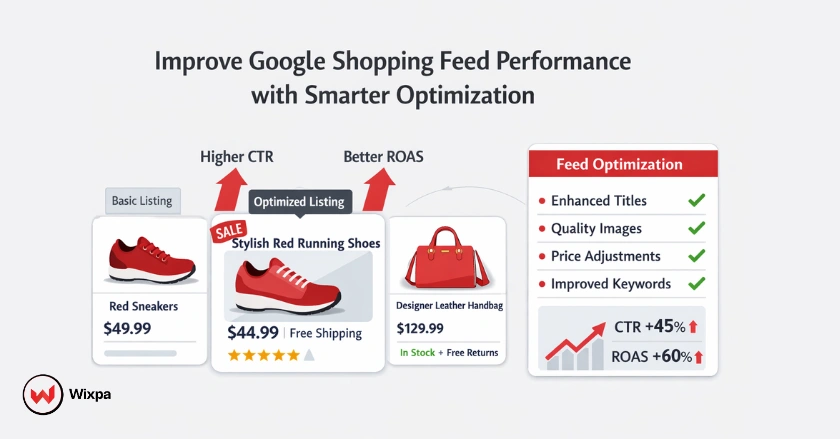
You can improve Google Shopping feed performance by optimizing key product data attributes like titles, descriptions, and images to match search intent. This process is known as Google Shopping feed optimization, and it directly impacts visibility, CTR, and ROAS.
Think of your product feed as the direct line of communication between your inventory and potential customers. If that line is static or unclear, you lose sales. Whether you are a small boutique in Austin, Texas, or a global enterprise, the quality of your data dictates your visibility.
Quick Summary
Optimizing your Google Shopping feed is crucial for enhancing ad visibility and driving sales. Focus on accurate titles, high-quality images, and using custom labels for better bidding. Regularly monitor Google Merchant Center for errors to keep your campaigns running smoothly. Consistent product feed optimization and proactive shopping feed management help prevent disapprovals and lost impressions.
What Is A Google Shopping Feed?
A Google Shopping feed is a structured digital file containing a list of products you want to advertise. It acts as a map for Google, organizing your product data so the algorithm knows exactly when and where to show your ads to interested shoppers.
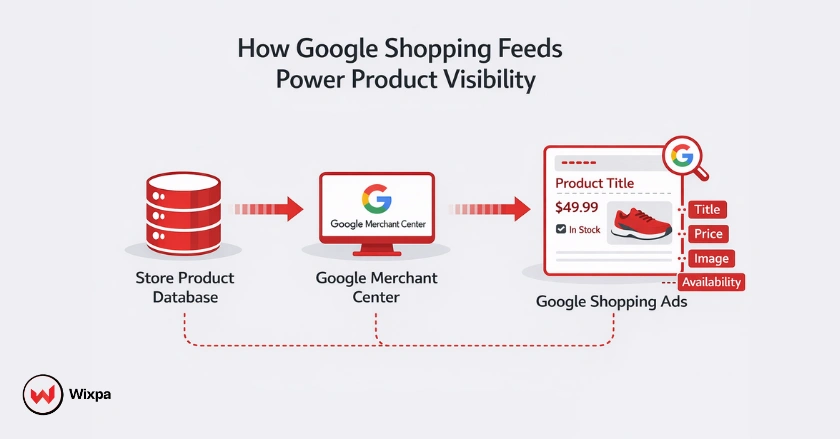
Without a well-structured feed, your beautiful products might never see the light of day on the search results page. The feed lives inside the Google Merchant Center feed system, which serves as the central hub for validating and distributing product data.
Your Digital Product Catalog
Your feed is essentially a dynamic spreadsheet that translates your website’s inventory into a language Google understands. It contains all the vital stats about your stock, from color and size to price and availability.
Navigating Google Merchant Center
The Merchant Center is where the magic happens. It validates your feed, checking for errors and ensuring your data meets Google’s strict policies before passing it on to Google Ads.
Product Data Attributes
Every feed relies on specific attributes to function. These are the building blocks of your campaign, such as the Global Trade Item Number (GTIN), MPN, and standardized Google Product Categories.
How Do I Optimize Feed Attributes?
Successful product feed optimization focuses on relevance, accuracy, and completeness across every required attribute. You optimize feed attributes by placing the most relevant keywords at the front of your product titles and ensuring descriptions are rich in details. High-quality data helps Google match your products to user searches more accurately, lowering your cost per click.
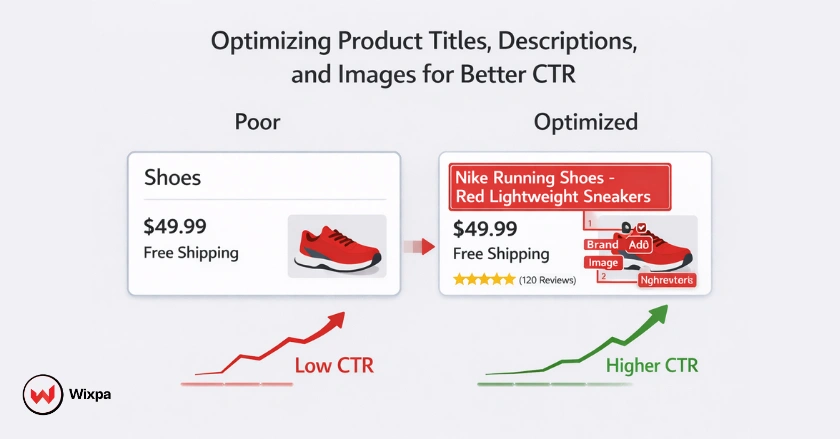
The attributes you choose to refine can make or break your campaign performance. It’s not just about filling in the blanks; it’s about providing value to the algorithm and the human shopper.
Master Your Product Titles
The title is arguably the most important attribute. It affects SEO and ad rank heavily.
- Place the most important information first (Brand + Product Type + Attributes).
- Include strong keywords like color, size, and material.
- Avoid promotional text like “Free Shipping” in the title.
- Keep it under 150 characters, but focus on the first 70.
Crafting Compelling Product Descriptions
Your description should expand on the title, offering specific details that a user might be searching for.
- Mention specific features, technical specs, and use cases.
- Use natural language but include secondary keywords.
- Keep the most vital information in the first 160-500 characters.
- Ensure the tone matches your brand voice.
Visualizing Your Products
Images are the first thing a customer sees. If your image is blurry or generic, they will scroll past.
- Use high-resolution images with a white background.
- Show the product from multiple angles if possible.
- Ensure the image matches the variant (e.g., red shoe shows a red shoe).
- Avoid watermarks or text overlays on the main image.
What Are Advanced Feed Strategies?
Advanced feed strategies involve using Custom Labels to segment products for smarter bidding and leveraging Supplemental Feeds to fix missing data without altering your main site. These tactics allow for granular control over which products get budget priority.
Once you have the basics down, you need to look for ways to outperform competitors who are also doing the basics. These advanced methods give you that edge.
1. Using Custom Labels
Custom labels allow you to group products based on your own business logic.
- Identify your goals: Determine if you want to segment by margin, seasonality, or best-sellers.
- Assign values: Use Custom Label 0 through 4 to tag products (e.g., “High Margin” or “Winter Sale”).
- Adjust bids: Go into Google Ads and set different ROAS targets for these specific product groups.
- Monitor performance: Check if your high-priority groups are getting enough impression share.
2. Leveraging Supplemental Feeds
Sometimes your primary data source is lacking, and you can’t easily change your website backend.
- Create a Google Sheet: List the Product IDs you want to update.
- Add missing columns: Add columns for attributes you want to override or add, like product_type or promotion_id.
- Upload to Merchant Center: Connect this sheet as a “Supplemental Feed” in feed settings.
- Process the feed: Google will merge this data with your primary feed, filling in the gaps instantly.
3. Automating Data Transformation
Feed Rules in Merchant Center let you manipulate data on the fly. You can set rules to automatically replace “blue” with “navy” or append brand names to titles without touching your raw data file.
Which Tools Help Feed Performance?
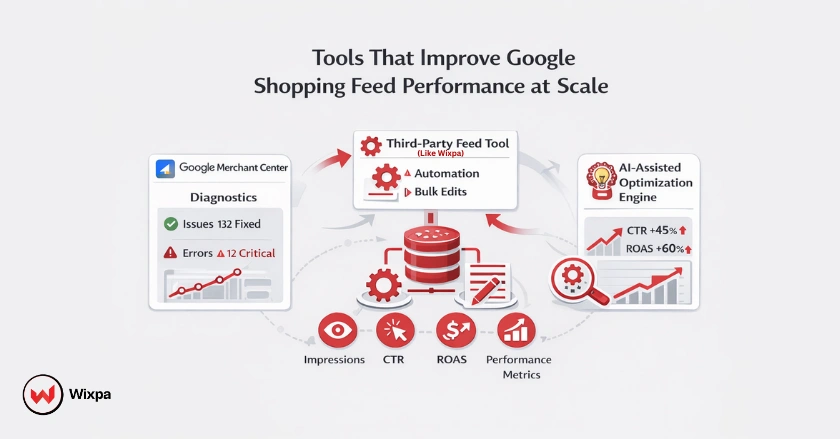
Effective shopping feed management requires continuous monitoring, automation, and error resolution as catalogs scale. The best tools for feed performance include Google Merchant Center for native diagnostics, third-party managers like Wixpa for automation, and AI-driven platforms for dynamic optimization. These tools save time and reduce manual errors.
Managing a feed manually via a spreadsheet is fine for 50 products, but impossible for 5,000. Scaling requires the right tech stack.
1. Google Merchant Center
This is your primary optimization hub. It’s free and essential. It provides the “Diagnostics” tab, which alerts you to item disapprovals and account warnings.
2. Third-Party Feed Management Tools
Tools like Wixpa Google Shopping Feed allow you to map your store’s data to Google’s requirements easily.
- Bulk Editing: Change thousands of titles in seconds.
- Channel Expansion: Push the same feed to Bing, Facebook, and Pinterest.
- Error Resolution: Get detailed advice on how to fix specific attribute errors.
- A/B Testing: Test different titles or images to see what converts better.
3. AI-Assisted Optimization Tools
Newer tools use AI to rewrite titles and descriptions automatically. They analyze search query reports and adjust your product data to match high-converting terms, closing the competitive gap.
How To Track Feed Success?
You track feed success by monitoring key metrics like Click-Through Rate (CTR), Conversion Rate, and Impression Share in Google Ads. Additionally, you must check Merchant Center diagnostics weekly to ensure product disapproval rates remain low.
Data without analysis is just noise. You need to know which levers to pull when performance dips.
Key Performance Metrics
Keep an eye on these indicators to gauge health.
- CTR: Low CTR often means your titles or images aren’t relevant to the search query.
- Conversion Rate: If clicks are high but sales are low, check your pricing or landing page experience.
- Search Impression Share: Tells you how much of the market you are capturing versus missing out on due to rank or budget.
- Product Status: The percentage of active vs. disapproved products in your feed.
Merchant Center Diagnostics
This report is your early warning system. It categorizes issues by severity: errors (red), warnings (yellow), and notifications (blue). Addressing red errors immediately is non-negotiable as they prevent ads from showing.
Iterative Optimization
Don’t set it and forget it. Run A/B tests on your product images. Try a lifestyle image versus a plain product shot and see which one drives more engagement.
What Feed Mistakes Should I Avoid?
You should avoid common mistakes like neglecting feed updates, submitting stale pricing data, and violating Google Shopping policies. These errors can lead to account suspension or wasted ad spend on products that are out of stock.
Prevention is better than a cure, especially when account suspension is on the line.
Ensuring Compliance is Non-Negotiable
Google has strict policies regarding prohibited content and landing page requirements.
- Ensure your checkout process is secure and functional.
- Don’t promote counterfeit goods.
- Verify that your return policy is clearly visible.
Data Inaccuracies
If your feed says a product costs $50, but your landing page says $55, Google will disapprove the item. This mismatch erodes trust and flags your account.
Neglecting Feed Updates
If you change inventory levels on your site, your feed needs to update immediately. Promoting “Sold Out” items is the quickest way to burn budget and annoy potential customers.
Pro Tips For Shopping Success
Here are some expert strategies to get ahead.
- Use Merchant Promotions: Add a promotion_id to your feed to show “Special Offer” text on your ads.
- Optimize for Mobile: Ensure your landing pages load fast on mobile devices, as most shopping traffic comes from phones.
- GTIN is King: Never fake a GTIN. If you don’t have one, use the identifier_exists attribute set to “no”.
Final Thoughts
Improving your Google Shopping feed is an ongoing journey, not a one-time task. The ecommerce landscape changes rapidly, and staying agile with your data is the only way to maintain a competitive edge.
Start by auditing your current feed today. Look for missing attributes, vague titles, or low-quality images. Fix the basics, then move on to custom labels and strategic bidding. Your future sales numbers will thank you.
FAQs
1. How often should I update my Google Shopping feed?
You should update your Google Shopping feed at least once a day. For stores with frequent price or inventory changes, hourly updates are ideal. Using the Content API or a feed management tool like Wixpa Google Shopping Feed helps automate updates and keep data accurate for Google Merchant Center.
2. What is the most important attribute in a Google Shopping feed?
The product title is the most important attribute in a Google Shopping feed. Google uses it heavily to match products with search queries. Including the brand, product type, color, size, and key features improves visibility and click-through rates.
3. Can I use the same product feed for Google and Facebook?
Yes, you can often use the same product feed for Google and Facebook. However, each platform has different formatting and policy requirements. Many US and UK ecommerce businesses use feed tools to automatically adapt one master feed for multiple channels.
4. Why are my products disapproved in Google Merchant Center?
Products are commonly disapproved due to price mismatches, missing images, incorrect availability, or policy violations. Check the Diagnostics tab in Google Merchant Center to identify the issue and fix it immediately to restore ad visibility.
5. Do I need a GTIN for every product?
Ideally, yes. Google prefers products with valid GTINs because they help confirm product identity. If you sell custom or handmade items without GTINs, set the identifier_exists attribute to “no” to avoid disapproval.