
Are your products not showing or underperforming in Google Shopping?
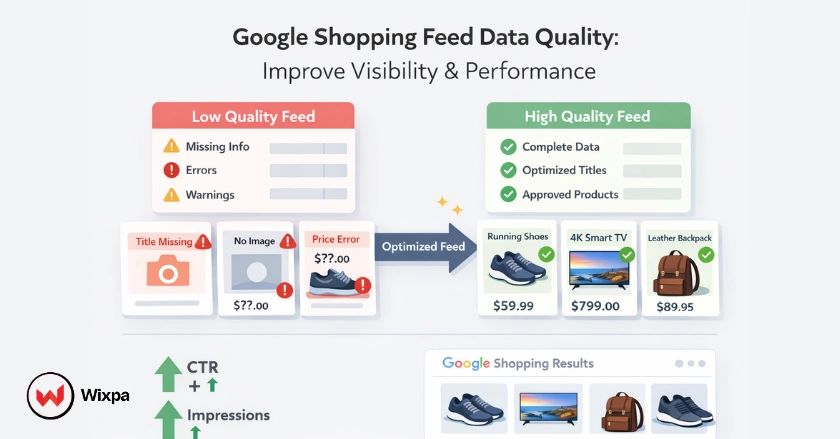
Google Shopping feed data quality is often the hidden reason. If your product data is incomplete, inaccurate, or poorly optimized, your listings won’t perform, no matter how much you spend on ads. Improving data quality means refining your titles, attributes, pricing, and images so Google can better understand and rank your products.
Short Summary
Google Shopping feed data quality determines how well your products perform. Accurate, complete, and optimized product data improves visibility, increases clicks, and drives more conversions. Focus on titles, attributes, pricing, and regular updates to stay competitive.
What is Google Shopping Feed Data Quality?
Google Shopping feed data quality refers to how accurate, complete, and relevant your product data is when submitted to Google Merchant Center.
What does “data quality” actually include?
It’s not just one thing; it’s the overall strength of your product information:
- Titles that match real search queries
- Descriptions that clearly explain the product
- Correct pricing and availability
- Unique identifiers like GTIN, brand, or MPN
- High-quality product images
The better your data, the easier it is for Google to understand your products and show them to the right audience.
Why Data Quality Matters for Performance
Google Shopping is driven by product data, not traditional SEO alone. That means your feed plays a direct role in visibility and conversions.
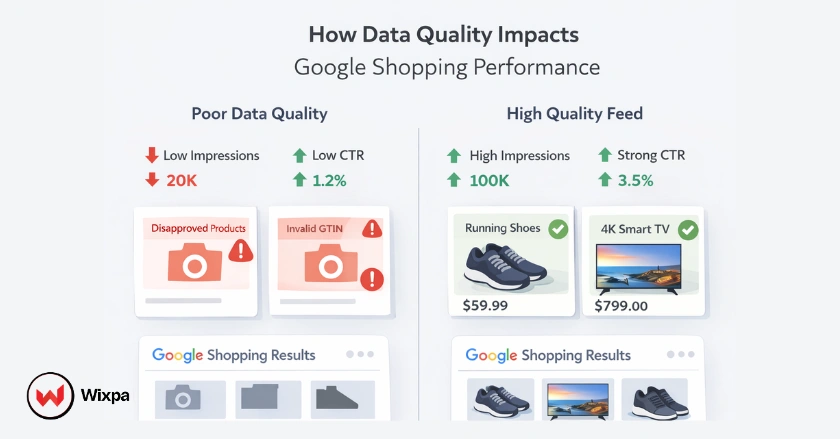
How poor data hurts performance
If your data is weak, you’ll likely see:
- Low impressions (products not showing)
- Low CTR (unattractive listings)
- Poor conversions (mismatch with intent)
- Product disapprovals
What happens when you improve it
On the flip side, strong data can:
- Increase impressions quickly
- Improve click-through rates
- Boost conversion rates
- Reduce disapprovals
In many real cases, fixing just a few key attributes can significantly improve performance within days.
Core Requirements for High-Quality Feed Data
To perform well, your feed must meet certain foundational requirements.
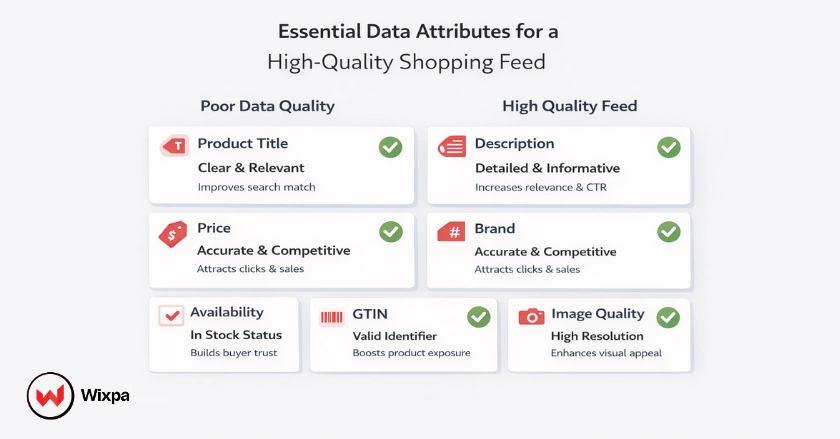
Essential data attributes
Your product feed should always include:
- Clear, keyword-rich product titles
- Accurate product descriptions
- Up-to-date pricing and availability
- Brand and GTIN (if available)
- Clean, high-resolution product images
Missing or incorrect data is one of the most common reasons for poor results.
How to Improve Google Shopping Feed Data Quality
Improving your feed is an ongoing process, not a one-time fix.
1. Optimize product titles
Titles should reflect how users actually search.
Instead of:
- “Running Shoes”
Use:
- “Men’s Running Shoes Lightweight Breathable Trainers”
More clarity = better visibility + higher CTR.
2. Complete all product attributes
The more complete your data, the better Google can match your products to relevant searches.
Focus on:
- Size, color, material
- Brand and identifiers
- Category-specific attributes
Incomplete data limits your reach.
3. Use high-quality product images
Images directly impact clicks. Make sure your images:
- Have a clean background
- Show the product clearly
- Avoid logos, watermarks, or clutter
Strong visuals build trust instantly.
4. Keep pricing and availability accurate
A mismatch between your website and feed can lead to disapproval in Google Merchant Center.
Even small inconsistencies can hurt performance, so regular syncing is essential.
5. Update your feed consistently
Fresh data performs better.
- Update daily if possible
- Sync stock and price changes quickly
- Remove outdated products
Consistency keeps your listings competitive.
Common Data Quality Issues (and Fixes)
Even well-managed stores run into common feed problems.
Missing or incorrect GTINs
If GTINs are available, always include them. They help Google identify your products accurately and improve matching.
Generic product titles
Titles that don’t match search intent fail to attract clicks even if impressions are deep.
Data mismatch between feed and website
If your product page shows different pricing or availability from your feed, it can lead to disapprovals.
Ignoring feed diagnostics
Many stores don’t regularly check for errors. Reviewing diagnostics helps you fix issues before they affect performance.
Real-World Example
A growing e-commerce store was struggling with low impressions despite having a large product catalog.
After reviewing their feed, they discovered missing attributes and inconsistent pricing. They improved titles, added product identifiers, and synced their data properly. Within a few weeks:
- Impressions increased significantly
- CTR improved by over 25%
No major ad changes, just better feed data.
A Simple Optimization Approach
If you want a manageable process, follow this approach:
Step-by-step flow
- Audit your feed regularly
- Fix disapprovals first
- Improve titles and attributes
- Update pricing and availability
- Monitor performance and refine
This keeps your workflow simple while still delivering strong results.
Conclusion
Google Shopping feed data quality is the foundation of your performance.
It decides whether your products show up, get clicks, and convert into sales. When your data is clean, complete, and aligned with search intent, everything else becomes easier.
Focus on consistent improvements rather than one-time fixes. Because in Google Shopping, better data doesn’t just help it win.
FAQs
1. What is Google Shopping feed data quality?
Google Shopping feed data quality refers to how accurate, complete, and optimized your product data is. It includes titles, descriptions, pricing, images, and identifiers. High-quality data improves visibility, increases clicks, and helps your products perform better in shopping results.
2. How can I improve my Google Shopping feed data quality?
You can improve data quality by optimizing product titles, completing all attributes, fixing feed errors, and updating pricing regularly. Using tools like Wixpa can also help automate feed optimization and maintain consistent product data quality at scale.
3. Why are my products getting disapproved?
Products are usually disapproved due to missing or incorrect data, policy violations, or mismatches between your website and feed. Fixing these issues in Google Merchant Center can restore visibility and improve overall performance.
4. Does feed data quality affect Google Ads performance?
Yes, feed data quality directly impacts ad performance. Better product data improves relevance, which leads to higher impressions, better click-through rates, and more conversions in Shopping campaigns.
5. How often should I update my product feed?
You should update your product feed daily or whenever there are changes in pricing, stock, or product details. Regular updates ensure accuracy, prevent disapprovals, and help maintain strong performance.