
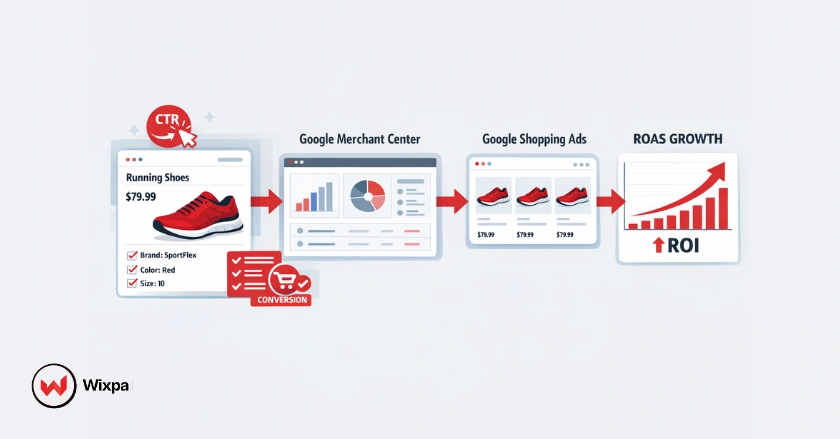
Improving your Google Shopping feed conversion is the ultimate key to maximizing your return on ad spend (ROAS) and driving scalable e-commerce revenue. When your product data is structured correctly, search engines immediately connect your items with high-intent buyers ready to purchase.
Are you tired of seeing clicks drain your budget without turning into actual sales? Optimizing your Google Shopping feed transforms your campaigns from basic visibility tools into high-converting sales engines, especially for competitive markets like retail spaces in Chicago or online nationwide.
Quick Summary
- Fix your foundation: Complete your Google Merchant Center setup perfectly.
- Optimize titles & images: Use structured product titles and high-resolution images.
- Track accurately: Implement server-side tracking and enhanced conversions.
- Leverage automation: Use Smart Bidding and Performance Max campaigns for scaling.
How to Set Up Merchant Center?
How do you build a strong foundation for your product feed? You start by mastering the pre-installation and setup phases to ensure all data feed attributes align directly with Google’s strict advertising policies.
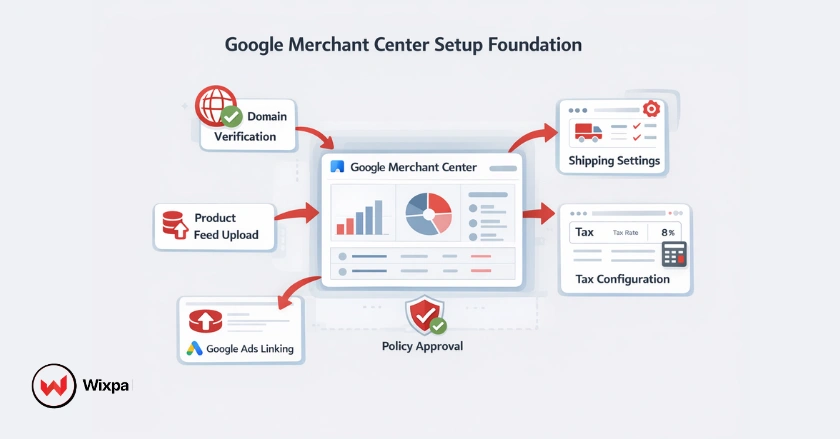
Google Merchant Center Setup Essentials
A well-configured Google Merchant Center acts as the bridge between your online store and Google Shopping Ads. Verify your domain, link your Google Ads account, and ensure your shipping and tax settings are perfectly accurate. Missteps here will quickly lead to account suspensions.
Core Product Data Attributes
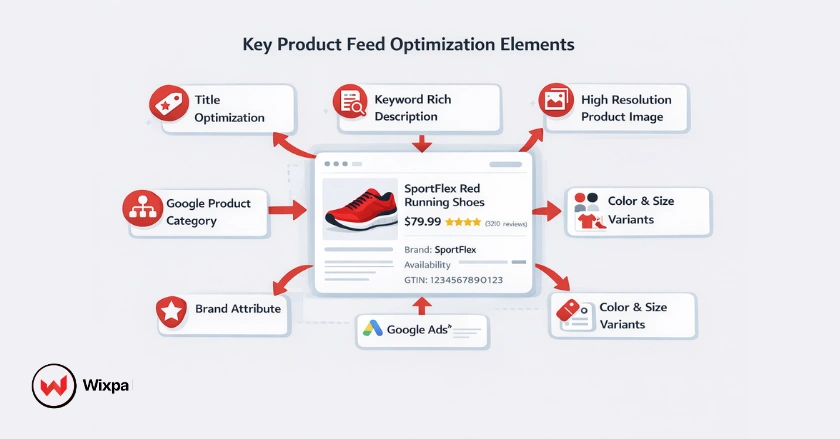
Certain product attributes are non-negotiable if you want high click-through rates. You must include accurate pricing, product availability, and unique identifiers like GTINs. Missing these data points severely limits your ad relevance.
- Always include an accurate brand attribute.
- Use the exact Google Product Category taxonomy.
- Ensure the link attribute directs to the correct variant page.
How to Optimize Feed Visibility?
How do you make your products stand out in the Google Shopping SERPs? You optimize every customer-facing element of your feed, focusing heavily on structured titles, keyword-rich descriptions, and compelling visuals.
Crafting Irresistible Product Titles
Your product titles are the single most important ranking factor for Google search engines. Place your most important long-tail keywords at the front of the title. For apparel, a structure like “Brand + Gender + Product Type + Color + Size” works best.
Engaging Product Descriptions
Product descriptions provide semantic context to the algorithm while convincing shoppers to click. Avoid keyword stuffing. Instead, naturally describe the item’s benefits, materials, and specific use cases to attract qualified buyers.
Comprehensive Product Attributes
- Audit your current feed for missing color, material, or size attributes.
- Update all item variations to reflect true inventory levels.
- Replace generic placeholder photos with high-resolution images showing the product in use.
How to Use Advanced Bidding?
How can you push ad spend toward your bestselling products? You utilize custom labels to segment your inventory, allowing your bidding strategy to adapt based on profit margins, seasonal trends, and current market demand.
Custom Labels for Targeting
Custom labels give you granular control over your product feed structure. You can tag products as “High Margin,” “Clearance,” or “Top Sellers.” This allows you to group similar items into specific ad groups for better budget control.
Strategic Bidding & Campaign Structure
- Use standard Shopping campaigns to gather baseline search term reports.
- Transition to Smart Bidding strategies like Target ROAS once you have enough conversion data.
- Use negative keywords to block irrelevant traffic from draining your daily budget.
How to Maximize Conversion Rates?
How do you convince a shopper to buy right now? You leverage urgency and value by deploying automated discounts, dynamic pricing tools, and highlighting clear promotions directly in the shopping annotations.
Implementing Google Merchant Promotions
Merchant Promotions display a clickable “special offer” link on your Product Listing Ads. This visual cue dramatically increases your click-through rate. Ensure your promotion titles are clear and the sale_price attribute updates in real-time.
Adapting to Market Dynamics
Competitor pricing changes daily, especially during events like Black Friday or Cyber Monday. Use dynamic pricing software to ensure your prices remain competitive. Buyers easily spot overpriced items and will quickly scroll past them.
How to Track Feed Conversions?
How do you measure the true ROI of your PPC efforts? You must deploy advanced tracking tags across your website, ensuring every click, add-to-cart, and final purchase registers accurately within your attribution models.
Google Conversion Tracking
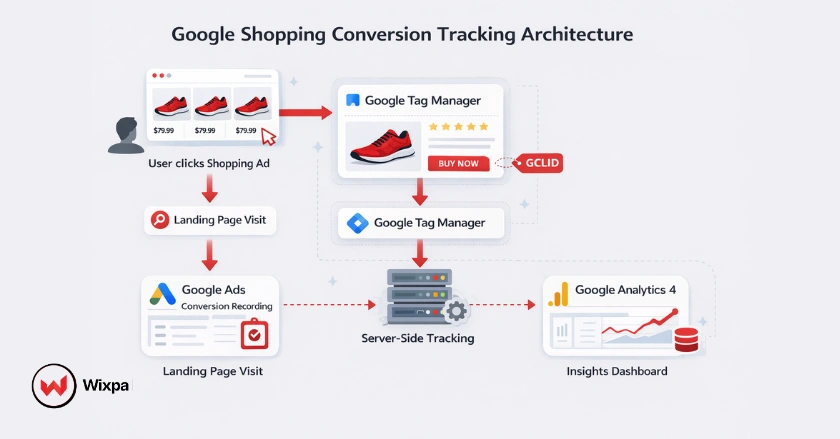
Installing the global site tag via Google Tag Manager is your baseline requirement. Ensure the conversion window matches your typical customer journey, whether that takes 7 days or 30 days.
Server-Side Tracking & Click ID
For the most accurate data, implement server-side tracking. This protects your conversion tracking from ad blockers and browser privacy updates. Always capture the Google Click ID (GCLID) to pass precise user data back to the platform.
Google Analytics 4 Insights
- Link your Google Analytics 4 account directly to your Google Ads profile.
- Import GA4 e-commerce events as secondary conversion actions.
- Analyze the user paths to find exactly where shopping cart abandoners drop off.
How to Grow Sustained Conversions?
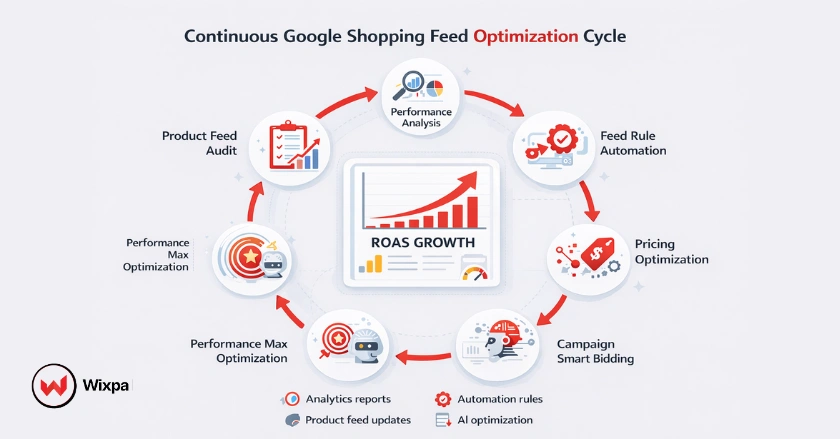
How do you keep improving your ROAS over time? You continuously monitor your analytics, apply automated feed rules to clean up errors, and feed better audience signals back into the Google algorithm.
Analyzing Performance Insights
Review your item-level performance reports weekly. Identify products with high impressions but zero clicks, which indicates poor product images or uncompetitive pricing. Fix these bottlenecks immediately to restore profitability.
Leveraging Automation & AI
Performance Max campaigns use machine learning to optimize delivery across all Google channels. To feed the AI properly, use automated feed rules to constantly refresh your product availability and pricing without manual spreadsheet uploads.
Customer-Centric Retargeting
- Upload your Customer Match lists to target previous buyers.
- Build audience segmentation based on specific product categories viewed.
- Apply seasonal modifiers to push ads harder when your specific buyers are active.
Pro Tips
Never manipulate your sale_price attribute falsely to create fake discounts. Google strictly enforces pricing policies, and doing so will trigger an immediate account suspension. Furthermore, regularly check your Merchant Center diagnostics tab for warnings. Fixing a “yellow” warning today prevents a “red” suspension tomorrow.
Final Thoughts
Scaling your e-commerce revenue doesn’t require magic; it simply requires clean data and strategic execution. By implementing these eight secrets, you will dramatically improve your visibility, capture higher-intent traffic, and watch your ROAS climb. Don’t let your competitors steal the spotlight. Start optimizing your feed attributes today and take control of your sales growth.
FAQs
1. What is a Google Shopping feed?
It is a structured file or spreadsheet containing all your product data, like titles, prices, and images, which Google uses to generate your Product Listing Ads.
2. How often should I update my feed?
You should update your feed at least once a day. If your prices or inventory levels change rapidly, consider using API integrations to update your data in real time.
3. Why are my products disapproved?
Products are usually disapproved due to mismatched pricing between your feed and your website, missing shipping costs, or policy violations regarding restricted items. Moreover, using an app like Wixpa Google Shopping feed helps you manage your feed properly.
4. Does schema markup help shopping campaigns?
Yes. Adding automatic product schema markup to your landing pages helps Google verify the accuracy of the data in your feed, leading to fewer disapprovals.
5. What is a good conversion rate for Google Shopping?
A strong conversion rate typically hovers around 1.5% to 2.5%, though this varies heavily depending on your industry, product price point, and overall market demand.