
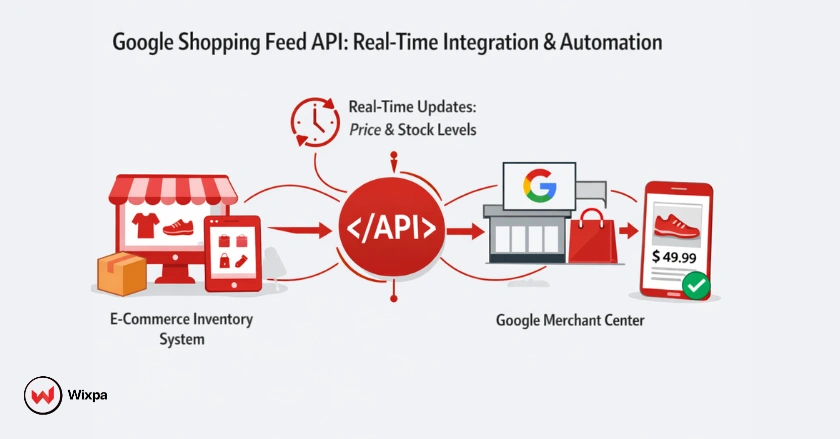
The Google Shopping Feed API is a powerful interface that allows eCommerce businesses to programmatically upload and manage product data in Google Merchant Center without manual file uploads. It enables direct, real-time communication between your inventory system and Google, ensuring that price, availability, and product details are always up-to-date for potential customers.
Why is this essential for modern retail? If you manage hundreds or thousands of SKUs, manually updating spreadsheets (or even scheduled fetches) often leads to data lags. A customer clicking an ad for a product that went out of stock an hour ago results in wasted ad spend and a frustrating user experience. By integrating the Content API for Shopping (now evolving into the Merchant API), you automate this entire workflow, gaining a significant competitive edge in the crowded Google Shopping landscape.
Quick Summary
- What is it? A Google API that sends product data directly to Merchant Center in real time.
- Why use it? Automates inventory, pricing, and availability updates without manual feeds.
- Key benefit: Prevents disapprovals and wasted ad spend on out-of-stock products.
- How to start: Requires a Google Cloud project, service account, and API integration or feed tool.
The Critical Role of Google Shopping in Modern eCommerce
Google Shopping has transformed from a simple comparison engine into a dominant visual search platform. When a user searches for “running shoes” or “ergonomic office chair,” they aren’t just looking for links; they are looking for images, prices, and reviews instantly.
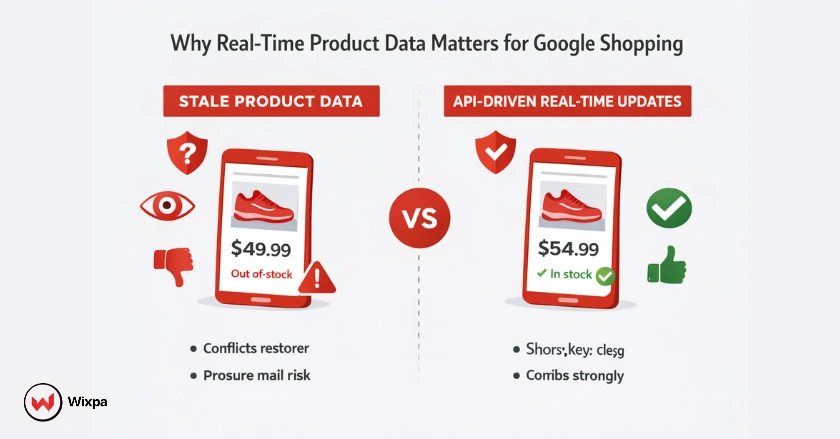
If your data is stale, Google penalizes you. Discrepancies between your landing page price and your ad price can lead to account suspensions. The API solves this by pushing updates the moment they happen in your warehouse or CMS.
Why API Integration is the Future for Dynamic Product Management
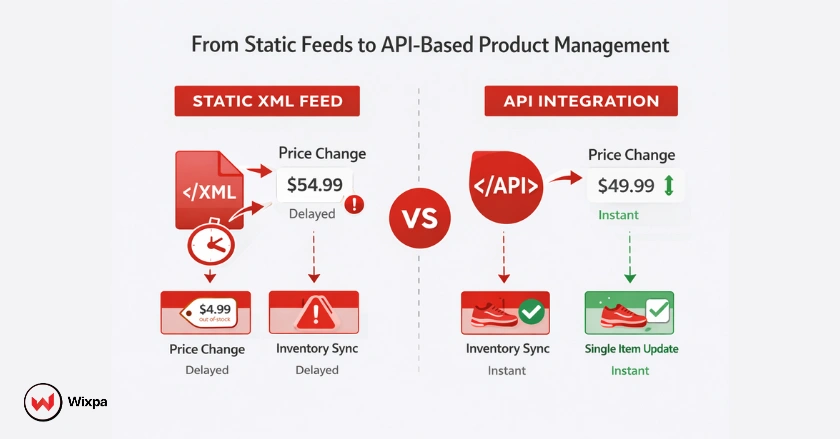
Static feeds are a relic of the past. Relying on a daily XML fetch means your data is always at least a few hours old. API integration allows for dynamic product management. This means:
- Instant Price Changes: Flash sale starting at noon? The API updates Google immediately.
- Inventory Accuracy: Sold the last unit? The API pauses the ad instantly.
- Granular Control: Update a single attribute for one product without re-uploading the entire catalog.
What is the Google Shopping Feed API?
The Google Shopping Feed API is not a single “feed” file but a programmatic interface. It allows applications to interact directly with the Google Merchant Center platform.
Technically, most developers have historically used the Content API for Shopping. This RESTful API allows you to manage products, inventory, and accounts. However, Google is currently transitioning towards the Google Merchant API, a more modular and robust version designed to handle the growing complexity of modern eCommerce, including advanced reporting and repricing capabilities.
Evolution From Content API for Shopping to the Google Merchant API
The shift from the “Content API” to the “Merchant API” represents Google’s commitment to better developer experiences.
The classic Content API for Shopping was great for basic product insertion. The new Merchant API introduces better design patterns and features that align with other modern Google APIs. While the core function (getting product data to Google) remains the same, the new architecture supports more advanced features like automated feed rules and granular regional availability settings.
Core Capabilities of the Google Merchant API
The API isn’t just for uploading products. It empowers you to:
- Manage Accounts: Create and configure sub-accounts for multi-client setups.
- Product Updates: Insert, update, or delete individual items instantly.
- Inventory Management: Update local inventory for “Near Me” searches.
- Diagnostics: Retrieve product status and error reports programmatically.
Why is API Automation Crucial for eCommerce Growth?
Scaling an online store without automation is like trying to fill a swimming pool with a teaspoon. Eventually, the volume of work becomes unmanageable.
Overcoming Manual Feed Management Challenges
Manual feeds (CSV, TSV, or XML files) are prone to human error. A misplaced column or a broken formula can disapprove thousands of products overnight. Furthermore, manual feeds have a “lag time.” If you sell out of a product at 10 AM but your feed fetch isn’t until 2 AM the next day, you are paying for ads on out-of-stock items for 16 hours.
Key Benefits of API Integration and Automation
- Real-time Synchronization: Price and stock changes are reflected on Google Shopping within minutes.
- Reduced Account Suspensions: Accuracy prevents “Mismatched Value” policy violations.
- Scalability: Whether you add 50 or 50,000 new SKUs, the API handles the load without you needing to format massive spreadsheets.
- Enhanced Customer Experience: Shoppers see accurate info, leading to higher trust and conversion rates.
How Do I Get Started with Google Shopping Feed API Integration?
Implementing an API connection requires technical setup. Here is the practical roadmap.
Prerequisites and Account Setup
Before writing a single line of code, you need the right accounts:
- Google Merchant Center Account: The destination for your data.
- Google Cloud Project: You must create a project in the Google Cloud Console to enable the API.
- eCommerce Platform Access: You need administrative access to your store (Shopify, Magento, Custom, etc.) to export data.
Authentication and Authorization
Google uses OAuth 2.0 for security. You cannot just “send” data; you must prove who you are. Steps to Authenticate:
- Navigate to the Google Cloud Console APIs & Services dashboard.
- Enable the “Content API for Shopping” (or Merchant API).
- Create a Service Account. This is a special Google account that belongs to your application rather than a person.
- Download the JSON key file for this Service Account.
- Crucial Step: Go to Google Merchant Center > Users, and add the Service Account email address as a user with “Admin” or “Standard” access.
Core API Actions
Once authenticated, your application can perform standard CRUD (Create, Read, Update, Delete) operations.
- Insert: Adds a new product or updates an existing one if the ID matches.
- Get: Retrieves the current data of a product to check its status.
- Delete: Removes a product from your Merchant Center account.
- Inventory: Specifically updates price and availability without touching the main product description or image URL.
How Can I Build Robust Automation Workflows?
Integration is just the start; automation is the goal.
Real-time Inventory and Pricing Synchronization
The most valuable workflow is the “inventory listener.” You should set up your system so that whenever a transaction occurs in your store (or an inventory update arrives from your warehouse data), a trigger fires. This trigger sends a specific inventory call to the Google Shopping Feed API to update the quantity and availability status immediately.
Dynamic Product Data Management
Don’t just set it and forget it. Automation can help with A/B testing titles. You can programmatically change product titles to include different keywords (e.g., “Men’s Running Shoe” vs. “Men’s Red Sneaker”) and track performance, rotating the best performers automatically. Many Shopify merchants use feed management tools like Wixpa to access API automation without building custom integrations.
Advanced Feed Strategies
Go beyond the basics. Use the API to manage regional availability. If you have warehouses in New York and California, the API can tell Google which zip codes can receive 2-day shipping and which products are out of stock in specific regions, optimizing your ad spend geographically.
What About Data Quality and Error Management?
Garbage in, garbage out. The API is fast, but if you send bad data, you get errors fast.
Proactive Feed Validation and Diagnostics
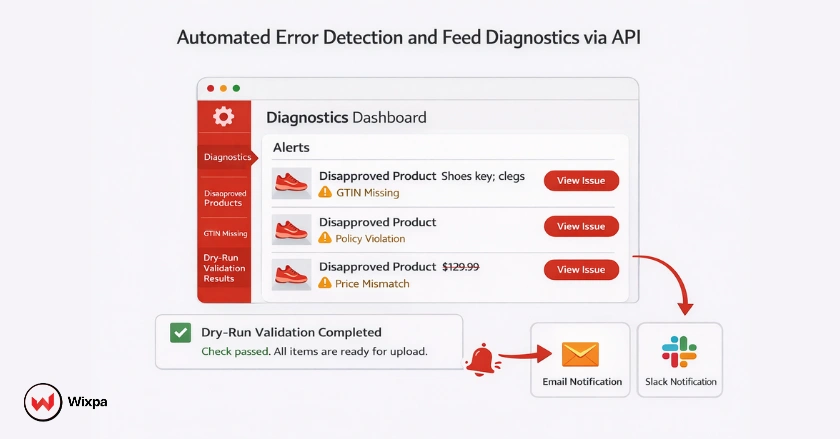
One of the best features of the API is the ability to “dry run” or validate data before it goes live. You can send product data with a dryRun parameter. Google will process it and tell you if it would be approved or if there are errors (like missing images or GTINs), without actually affecting your live ads.
Automated Error Detection and Resolution
Build a script that calls the productstatuses method daily. If a product is disapproved, your system can alert your marketing team via Slack or email immediately. This reduces the downtime of your best-selling products from days to minutes.
How Does AI and Intelligent Automation Fit In?
The future of the Google Shopping Feed API is intelligent, AI-driven data enrichment.
The Nexus of API and AI for Optimized Product Data
Imagine using an AI tool (like ChatGPT or specialized eCommerce AI) to rewrite your product descriptions for better SEO, and then using the API to push those optimized descriptions to Google automatically. This “No-code AI automation” pipeline can revitalize a stale product catalog in hours.
Smart Automation for Performance Enhancement
Machine learning models can analyze your campaign reporting. If a product has high clicks but low conversions, an automated system could flag it via the API to lower the price or change the main product image to a variant that might convert better.
Measuring Performance and Optimizing Campaigns
You can’t improve what you don’t measure. The API helps here, too.
API-Driven Performance Monitoring
While the Reporting API is distinct, it works hand-in-hand with the Content API. You can programmatically pull performance data (clicks, impressions, conversions) and map it directly against your product attributes to see which “Brand” or “Category” is driving the most ROI.
Strategic Optimization
Use this data to create Custom Labels dynamically. If a product has a high ROAS (Return on Ad Spend) over the last 7 days, use the API to tag it with “Custom Label 0: Top Performer.” Then, set your Google Shopping campaigns to bid higher on that specific label.
Future-Proofing Your eCommerce with Google Shopping Feed API
The eCommerce landscape in 2026 and beyond will be defined by speed and data density.
The Inevitable Shift
As Google SGE (Search Generative Experience) and AI Overviews become more prevalent, structured data is king. The API ensures your structured data is pristine. Manual file uploads will likely become obsolete for competitive enterprise retailers.
Continuous Improvement
Start small. First, automate inventory. Then, automate pricing. Finally, move to full content optimization. This step-by-step approach ensures stability while you grow.
Master Your Google Shopping Feed with API Integration & Automation
Taking control of your product feeds has never been easier. With the right API integration, you can automate updates, maintain accuracy, and focus on growing your eCommerce business.
The Power of Programmatic Product Management
We’ve covered how the Google Shopping Feed API moves you from static spreadsheets to dynamic, real-time data flow. It protects your budget by hiding out-of-stock items, boosts your SEO with fresh data, and scales effortlessly with your business.
Your Next Steps Towards API Mastery
- Audit: Check your current feed setup. Are you using a CSV?
- Connect: Create your Google Cloud Project and Service Account.
- Automate: Partner with a developer or use a robust feed management tool that utilizes the Content API for Shopping to handle the heavy lifting.
Ready to stop wrestling with spreadsheets? It’s time to let the code do the work.
Pro Tips for API Success
- Respect Quotas: Google has limits on how many API calls you can make per minute. Implement “exponential backoff” (retrying slowly) in your code to handle errors gracefully.
- Use Batching: Instead of sending one update at a time, group them into a “batch” request. This is faster and more efficient for server resources.
- Monitor Expiration: Products uploaded via API expire after 30 days if not updated. Set a recurring job to “refresh” your products even if the data hasn’t changed.
Final Thoughts
Integrating the Google Shopping Feed API might seem technical, but the business logic is simple: Better data equals better sales. Whether you are a solo entrepreneur in Austin or a multinational retailer, the speed at which you can adapt your product data to market changes will define your success. Don’t let your inventory sit in a static file while the market moves on.
FAQs
1. What is the difference between Google Merchant Center and the Shopping Feed API?
Google Merchant Center is the platform where products are managed. The Shopping Feed API sends product data to Merchant Center automatically.
2. Is the Google Shopping Feed API free to use?
Yes, the Google Shopping Feed API is free. Costs only apply to Google Shopping ads, not API usage.
3. Can non-developers use the Google Shopping Feed API?
Yes, non-developers can use feed management tools that handle API integration in the background without coding.
4. How fast does the Google Shopping Feed API update product data?
API updates are processed almost instantly. Price and availability changes usually reflect within minutes.
5. How do Shopify stores automate Shopping feed updates easily?
Shopify stores often use tools like Wixpa to automate API-based feed updates, apply rules, and keep product data synchronized with Google Merchant Center.