
Setting up promotions in your Google Merchant Center feed might seem tough. But it’s a great way to increase product visibility and drive sales. Mastering Google Merchant Center promotions is key to your Shopify or WooCommerce store. It gives your products the edge to stand out.
This guide covers everything. It starts with a basic setup and moves to advanced optimization strategies. You’ll learn to create promotions that achieve high conversion rates.
Quick Summary
Google Merchant Center promotions make your products pop in Google Shopping. They add eye-catching badges and show discount details. You can build promotions using the Promotions Builder by hand. Or, you can scale up using promotion feeds. The key is to understand Google’s editorial rules. Choose the right promotion type for your goals. Then, keep optimizing based on performance data. Success needs a strong feed structure, clear policies, and timing that matches your marketing campaigns.
What Makes Google Merchant Center Promotions So Effective?
I’ve run many promotional campaigns for e-commerce stores. I’ve seen how a good strategy can turn a struggling product feed into a money-maker. Google Merchant Center promotions do more than show discounts. They give shoppers strong reasons to pick your products instead of your competitors’.
Why Promotions Matter Boosting Visibility and Driving Sales
Add promotions to Google Merchant Center. Your products will show promotional badges in Google Shopping results. Visual indicators grab shoppers’ attention. This often leads to higher click-through rates and better conversion rates.
The psychological impact is significant. Shoppers examining many similar products will find those with clear value appealing. Strong promotional messages help highlight this value.
Key Strategic Benefits for Your Business
Implementing promotions in your Google Shopping feed delivers several measurable advantages:
- Higher click-through rates: Promotional badges enhance your products’ appeal in search results.
- Higher conversion rates: Clear discount messaging reduces buying.
- Improved Quality Score: Google rewards engaging ads with better positioning and lower costs.
- Competitive differentiation: Stand out when competitors aren’t using promotional features.
When to Use Promotions Strategic Timing and Purpose
The best promotional campaigns I’ve managed match clear business goals and seasonal trends. Think about promotions for new products. Clear seasonal stock. Compete with tough rivals. Use shopping events like Black Friday.
Local market conditions matter. If you’re targeting customers in busy cities, promotions are key. They help you stay visible in a competitive environment.
How do you set up promotions in Google Merchant Center?
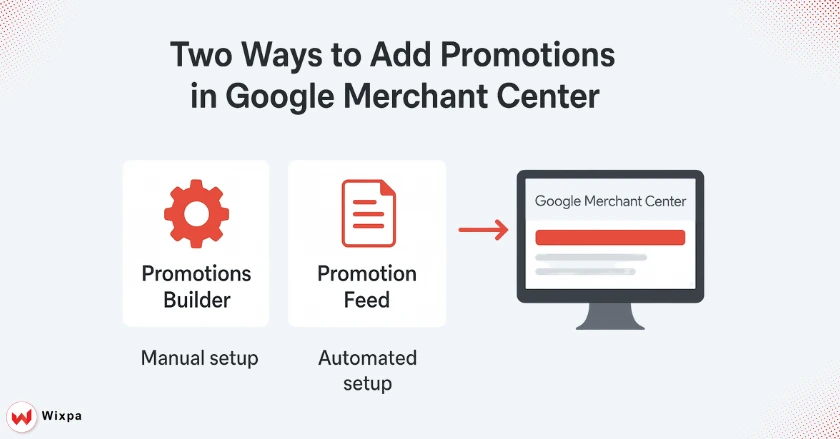
Google offers two different ways to create promotions. Each method fits various business sizes and technical skills. Knowing these options helps you pick the best method for your needs.
The Promotions Builder Manual Setup for Individual Offers
The Promotions Builder works perfectly for businesses running occasional, targeted promotions. Go to your Google Merchant Center account. Click on the Marketing tab, then select “Promotions” to use this tool.
This manual approach allows you to create individual promotions with detailed customization options. You will provide promotion details, set eligibility rules, and select qualifying products for each offer.
The Promotions Feed Scaling Your Promotional Strategy
For businesses running many promotions, promotion feeds are more efficient. This structured data method helps you manage many promotions with one feed file. The promotion feed works smoothly with your product feed. This creates a strong promotional strategy that grows with your business.
What should your promotions feed structure include?
To create a good promotion feed, you must know Google’s attribute needs and feed specs. The structure may look complex at first. But, using Google’s promotion feed specification leads to quick approval and better performance.
Setting Up Your Promotions Feed in Google Merchant Center
Begin by creating a new data feed specifically for promotions. In your Merchant Center account, navigate to “Feeds” and select “Add feed.” Select “Promotions” for your feed type. Then, set up your upload method. You can choose from Google Sheets, direct upload, or a scheduled fetch from your server.
Your feed registration should include the right country of sale. Also, make sure your feed follows Google’s structured data format.
Core Required Attributes The Foundation of Every Promotion
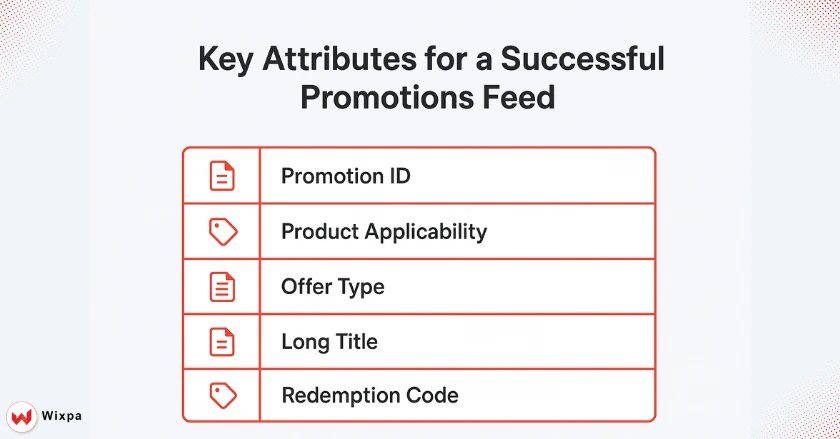
Every promotion in your feed must include these essential attributes:
- Promotion ID: A unique identifier for each promotion.
- Product Applicability: Defines which products are eligible.
- Offer Type: Specifies the discount structure (percentage, fixed amount, etc.).
- Long Title: Descriptive promotional headline
- Generic Redemption Code: Coupon code (if applicable).
These key attributes help Google understand and show your promotions properly.
Key Optional Attributes Enhancing Your Promotion Details
While optional, these attributes significantly improve your promotion performance:
- Product Filter: Target specific product categories or brands.
- Discount Amounts: Specify exact savings amounts.
- Gift Descriptions: Highlight free gifts or bonuses.
- Participation Criteria: Define customer eligibility requirements.
Adding optional attributes helps Google link your promotions to relevant searches and customer needs.
Practical Feed Creation and Management
I recommend starting with a Google Sheets template for your first promotion feed. This approach allows for easy editing and collaboration while maintaining proper formatting. As your promotional strategy grows, think about switching to automated feed generation. You can use your e-commerce platform or a third-party data feed app for this.
Your promotions feed should update often. It needs to show current offers and quickly remove expired ones.
How do you navigate Google’s approval process successfully?
Understanding Google’s promotion policies and editorial requirements prevents costly delays and rejections. From years of running promotional campaigns, I’ve found that checking for compliance early saves a lot of time and hassle.
Understanding Google’s Promotion Policies and Editorial Requirements
Google maintains strict editorial requirements for promotional content to ensure user experience quality. Your promotions should show real discounts. Use clear and honest language. Also, follow local advertising rules.
Don’t use promotional language that creates fake urgency, makes unrealistic claims, or violates Google’s advertising rules. Each promotion undergoes review against these comprehensive guidelines.
The Promotion Review Process
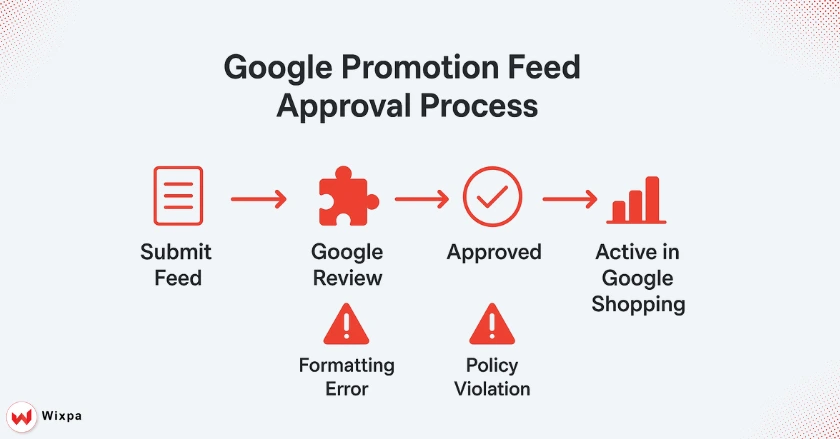
After submitting your promotion feed, Google typically completes reviews within 24 to 48 hours. Google’s systems check for three things: policy compliance, technical accuracy, and quality standards.
Approved promotions show up right away. Feedback explains why the committee turned down rejected promotions.
Common Rejection Reasons and Proactive Solutions
The most frequent rejection issues I encounter include:
- Inaccurate discount calculations: Always verify your math matches between your website and feed.
- Missing required attributes: Double-check that all mandatory fields contain valid data.
- Policy violations: Conduct a thorough review of Google’s promotion policies before submission.
- Technical formatting errors: Ensure your feed follows the exact specification format.
Troubleshooting Approved but Not Displaying Promotions
Sometimes promotions receive approval but do not appear in search results. This often happens when your eligible products don’t have enough search volume. It can also occur if your promotional targeting is too narrow. Expand your product filters or change your promotion criteria. This will increase the number of products and boost visibility.
What advanced strategies maximize promotion impact?
Beyond basic promotional setup, sophisticated strategies can greatly amplify your results. Advanced techniques can set successful campaigns apart from mediocre ones. They often double or triple promotional ROI.
Tailoring Promotions to Specific Business Objectives
Different business goals need different promotional approaches. For new product launches, consider introductory discounts that encourage trial purchases. When clearing seasonal inventory, deeper discounts with clear end dates create urgency.
For customer acquisition, create promotions aimed at first-time buyers. Offer attractive welcome deals to encourage them to shop again.
Creative Offer Types Beyond Simple Discounts
While percentage discounts remain popular, creative offer structures often generate superior results.
- Buy-one-get-one promotions increase average order values while moving inventory.
- Tiered discounts: Encourage larger purchases through volume-based savings.
- Free shipping offers: Remove buying barriers for price-sensitive customers.
- Bundle promotions: Group complementary products for increased sales.
Leveraging “Product Filters” for hyper-targeting.
Product filters enable incredibly precise promotional targeting.
You can create promotions for:
- specific brands
- price ranges
- product categories
- individual product IDs
You can run several promotions at the same time without issues. Each one targets different product segments with customized messages and discount plans.
Integrating promotions with broader marketing efforts.
Your Google Merchant Center promotions need to align with your email campaigns, social media ads, and other marketing channels. Consistent messaging at every touchpoint boosts your value and raises conversion rates.
Time your promotions with seasonal shopping trends and local stock levels. This way, you can boost impact and avoid overselling.
How do you measure and optimize promotion performance?
Successful promotional campaigns need continuous monitoring and optimization. The metrics you track and how you act on that data shape your long-term success in promotions.
Key Metrics for Evaluating Promotion Effectiveness
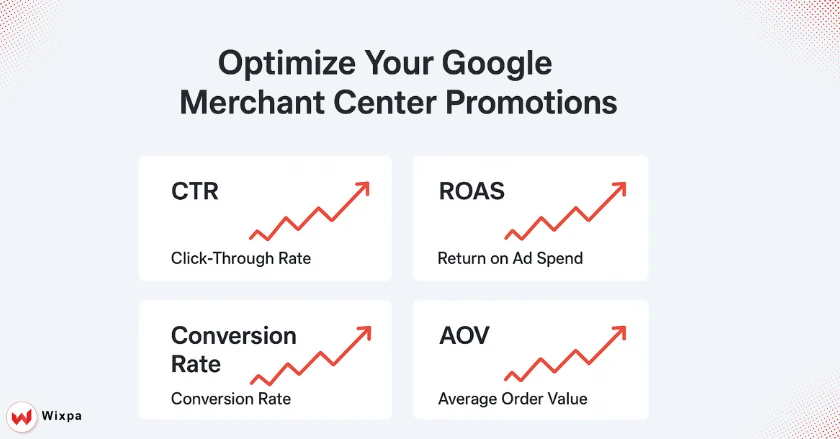
Focus on these critical performance indicators:
- Click-through rate improvements: Compare promoted vs. non-promoted product performance.
- Conversion rate changes: Measure actual purchasing behavior, not clicks.
- Return on ad spend (ROAS): Calculate total revenue generated per promotional dollar invested.
- Average order value impact: Assess whether promotions increase or decrease the order size.
Analyzing performance data and identifying opportunities.
Google Merchant Center provides detailed reporting on promotional performance through the Marketing tab. Regular analysis shows which promotion types, discount levels, and product categories work best.
Watch for differences in geographic performance. Local market conditions can greatly affect how well promotions work.
Strategies for Ongoing Optimization
Successful promotion optimization follows a systematic approach:
- A/B testing different discount levels: Test 10% vs. 15% vs. 20% discounts on similar products.
- Rotating promotional themes: Alternate between percentage discounts, fixed amounts, and creative offers.
- Seasonal timing adjustments: Align promotion intensity with shopping season patterns.
- Product mix optimization: Focus promotional budgets on products with the highest profit margins.
Final Thoughts: Transform Your E-commerce Strategy with Smart Promotions
Google Merchant Center promotions can help businesses a lot. Investing time in setting them up and optimizing them pays off. The strategic edge isn’t about discounts. It’s about how those offers grab attention and inspire action.
Recap of the Power of Google Merchant Center Promotions
Promotions in your Google Shopping feed can shield your products from competitors when done well. They increase visibility and click-through rates. They also provide customers with clear reasons to choose your business over competitors.
The technical setup needs careful attention. But the long-term benefits make the initial investment worthwhile. Your promotional strategy is a growth engine that works around the clock. It attracts qualified customers consistently.
Continuous Improvement and Future Growth
Success with Google Merchant Center promotions comes through consistent testing, measurement, and optimization. Begin with simple promotional campaigns. Learn from the data you collect. Then, as you gain confidence and skills, add more advanced strategies.
Promotional strategies that work in big cities might need adjustments for smaller local markets. Always consider your specific customer base and competitive landscape when designing campaigns. Set up your first promotion feed today. You’ll see an immediate boost in product visibility and sales performance.
FAQ
1. How do I add promotions in Google Merchant Center?
To add promotions to Google Merchant Center, go to Marketing → Promotions and click Add Promotion.Choose promotion type, set dates, and apply to products. Approved promotions boost your Shopping ads visibility and attract more clicks.
2. Why can’t I see the Promotions tab in Google Merchant Center?
You may not see the Promotions tab if your account isn’t approved or your products aren’t eligible. Ensure your Merchant Center account meets Google’s country and policy requirements, and your Shopping feed is active with valid product data.
3. What types of promotions can I add in the Merchant Center?
You can create discount-based, buy-one-get-one, or free shipping promotions. These offers appear on your product listings, helping attract buyers and increase conversions directly through Google Shopping and Merchant Center campaigns.
4. How long does it take for promotions to show on Google?
After submission, Google reviews your promotion within 12–24 hours. Make sure your promotion meets eligibility requirements, matches product data, and uses accurate start and end dates to ensure fast approval and display on Shopping ads.
5. Can I automate promotions in Google Merchant Center?
Yes, automation tools like EasyFeed allow you to add promotions to Google Merchant Center automatically. These tools sync your store data, schedule offers, and optimize your product feed for better promotion performance.