
Are you wondering how to improve your product listings with a Google Merchant Center supplemental feed? This guide explains what it is, why it matters, and how it helps optimize your Google Shopping performance. This guide will show you how to use them to enhance your listings, correct errors, and ultimately boost your sales.
Quick Summary
A Google Merchant Center supplemental feed is a secondary data source used to add or modify product information in your primary feed. It allows you to add missing details, update prices, manage inventory, and optimize your listings without changing your main data file. Using supplemental feeds helps improve your ad performance, corrects data errors, and gives you a competitive edge on Google Shopping.
Understanding Primary vs Supplemental Feeds
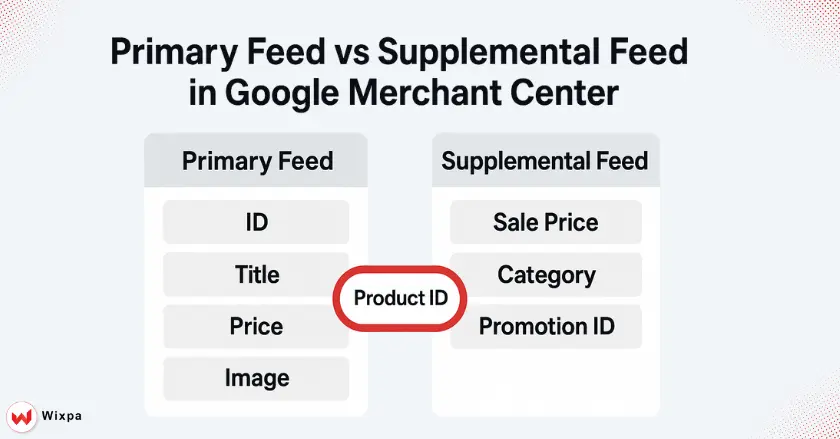
To successfully manage your products on Google, it’s crucial to understand the two main types of data feeds in Google Merchant Center. Both work together, but they serve different functions for managing your product information.
A primary product feed is the main source of data for your products. It contains all the essential product attributes Google needs to create your Shopping Ads and free listings, such as product ID, title, description, price, and product images. Think of it as the foundation of your product data.
A supplemental feed is an additional data source that you can link to your primary feed. Its purpose is to add or override information. For example, if your primary feed is missing a product category, you can add it with a supplemental feed. It connects to your primary feed using the product ID attribute.
Supplemental feeds are indispensable for modern online retailers because they provide flexibility. You can easily update pricing for a sale, add seasonal product details, or correct errors without having to edit your main product feed, which can often be complex and time-consuming. This agility is vital for effective feed optimization.
What Are Key Uses for Your Business?
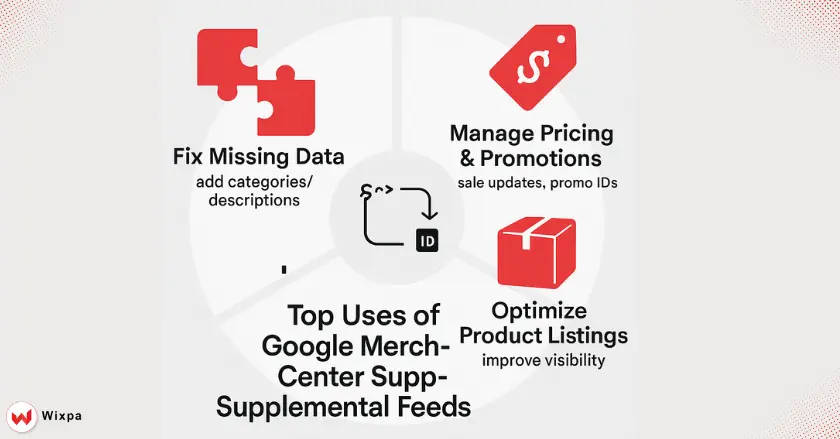
Supplemental feeds are more than just a technical feature; they are a strategic tool that can directly impact your campaign performance and ROI. Here are some practical ways you can use them.
- Correcting and Enriching Essential Product Attributes
If your primary feed has errors or is missing key information, a supplemental feed can fix it. You can add missing Google product category values, enrich a product description, or add product highlights to make your listings more compelling to shoppers on Google Search. - Managing Pricing and Promotions Strategically
You can use supplemental feeds to manage temporary price changes, like for a weekend sale. Simply create a feed with the product ID and the new sales price. You can also add promotion IDs to link products to specific promotions in your merchant account.
Setting Up Your Supplemental Feeds: A Step-by-Step Guide
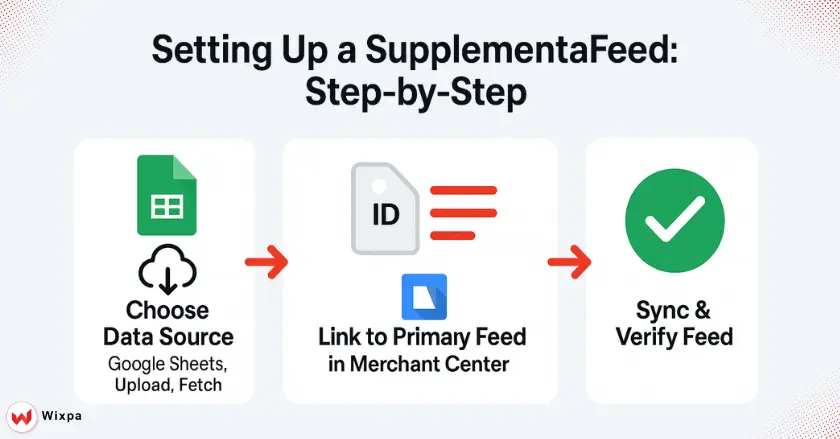
Creating a supplemental feed is a straightforward process within Google Merchant Center. Here’s how to get started and some best practices to follow.
- Choose Your Data Source: You can create your supplemental feed using Google Sheets, a scheduled fetch from a URL, or a manual file upload. Google Sheets is a popular choice because it’s easy to update and automatically syncs with Merchant Center. Other options include CSV, TSV, or XML files.
- Navigate Google Merchant Center: In your Google Merchant Center account, go to “Products,” then “Feeds.” Click the plus icon to add a new supplemental feed. You’ll be prompted to name your feed, select the connection method, and link it to your primary feed.
- Best Practices for Feed Creation: Ensure your supplemental feed includes a product ID column that exactly matches the IDs in your primary feed. Only include columns for the attributes you want to add or modify. This keeps your feed clean and easy to manage.
What Are Some Advanced Strategies for Google Merchant Center Supplemental Feed?
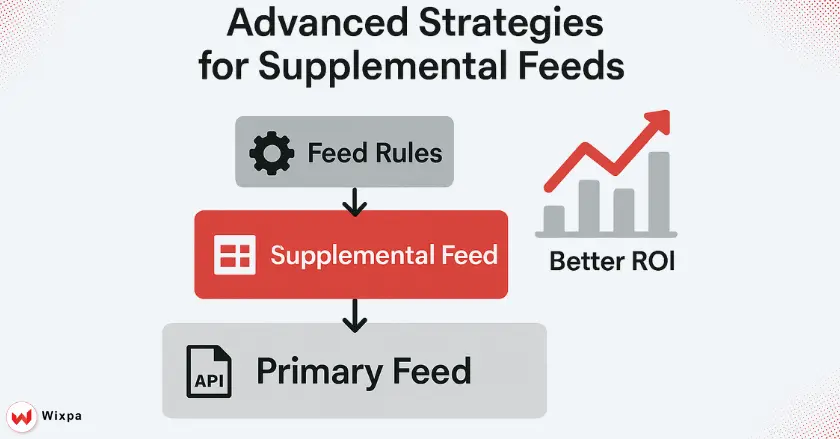
Once you’re comfortable with the basics, you can leverage advanced strategies to get even more out of your supplemental feeds and drive better results for your ad campaigns.
- Understand the Data Source Hierarchy: Google prioritizes data from your primary feed first, then supplemental feeds, and finally feed rules. This means information in a supplemental feed will override the primary feed, but a feed rule will override the supplemental feed.
- Use the Content API for Real-Time Updates: For businesses with rapidly changing inventory or pricing, like those managing local inventory, integrating with the Content API for Google Shopping allows for dynamic, real-time updates. This ensures your product information is always accurate.
- A/B Test Your Product Data: You can use supplemental feeds to test different versions of your product titles or product images. For example, create a feed with new product titles for a specific group of items and monitor campaign performance to see which version drives more clicks and conversions.
Final Thoughts
Effectively managing your product data is no longer optional for success in online retail. A Google Merchant Center supplemental feed lets you enrich listings, manage promotions, and optimize product data without changing core systems. By implementing the strategies outlined here, you can enhance your ad performance and gain a substantial competitive advantage.
FAQ
1. What is a Google Merchant Center supplemental feed?
A Google Merchant Center supplemental feed is used to update or enhance existing product data in your main feed, such as titles or descriptions. You can easily manage it using tools like the Google Merchant Center supplemental feed.
2. How do I add a supplemental feed in Google Merchant Center?
To add a supplemental feed, go to Feeds → Add Supplemental Feed, upload a file (CSV, TSV, or Google Sheets), and link it to your primary feed. Tools like the Google Merchant Center supplemental feed make this process effortless.
3. Why should I use a supplemental feed?
Using a supplemental feed helps improve your product data accuracy and ad performance without requiring edits to the main feed. It’s perfect for optimizing titles, custom labels, or promotions, saving time while keeping your main feed clean and stable.
4. Can I automate updates in a supplemental feed?
5. What’s the difference between primary and supplemental feeds?
A primary feed is the main source of product data, while a supplemental feed only adds or modifies existing attributes. It cannot create new products but helps optimize existing listings for better visibility and conversion results.